1
 →
GPT Image 2/2.5 prompt gallery, image prompt library, agentic skill, and CLI for OpenAI image generation/editing
wuyoscar/GPT-Image2-Skill is an open-source project on GitHub, mainly written in Python. GPT Image 2/2.5 prompt gallery, image prompt library, agentic skill, and CLI for OpenAI image generation/editing It currently holds 6,032 stars and 484 forks with 1 open issues, and was last pushed on 2026-09-30 (repository created 2026-04-22).
Git Homed tracks it on the Image Trending board and on the AI Image Trending list.
Prompts and reference images for GPT Image 2, 2.5 and 2.6, with two agent skills and a CLI.





Overview · Animation & web · 2.6 samples · 2.5 samples · Example · Quick start · Install · CLI reference · Guides · Gallery · Contribute
| Item | Value |
|---|---|
| Gallery size | 171 numbered entries across 31 categories, with selected images below |
| Surfaces | 2 Agent Skills + CLI: Claude Code / Codex, OpenClaw, Hermes Agent and other skill-capable agent runtimes |
| Last update | 2026-11-09 |
| Docs | English + 中文 |
Browse the images, open a prompt and try it with your own references. The gpt-image skill generates and edits images; get-prompt-from-image extracts prompts from images. The CLI and generation skill default to GPT Image 2.6 Flare. Image 2 prompts and the 2.5 reading material and task guides remain available.
For the CLI, export the relevant PDF pages as PNG, WebP or JPG, then attach them with -i. See the supported image-reference formats. Keep required text and edit constraints explicit.
For PPT work, try vector-style diagrams, icons and slide layouts. Save still images as PNG, JPEG or WebP; editable SVG or PowerPoint shapes need a separate authoring step.
The image is the starting asset. On the left, the local tool slices an eight-cell sheet into a GIF. On the right, the brain office becomes an animation and a webpage with clickable rooms and a clock-in/out toggle.
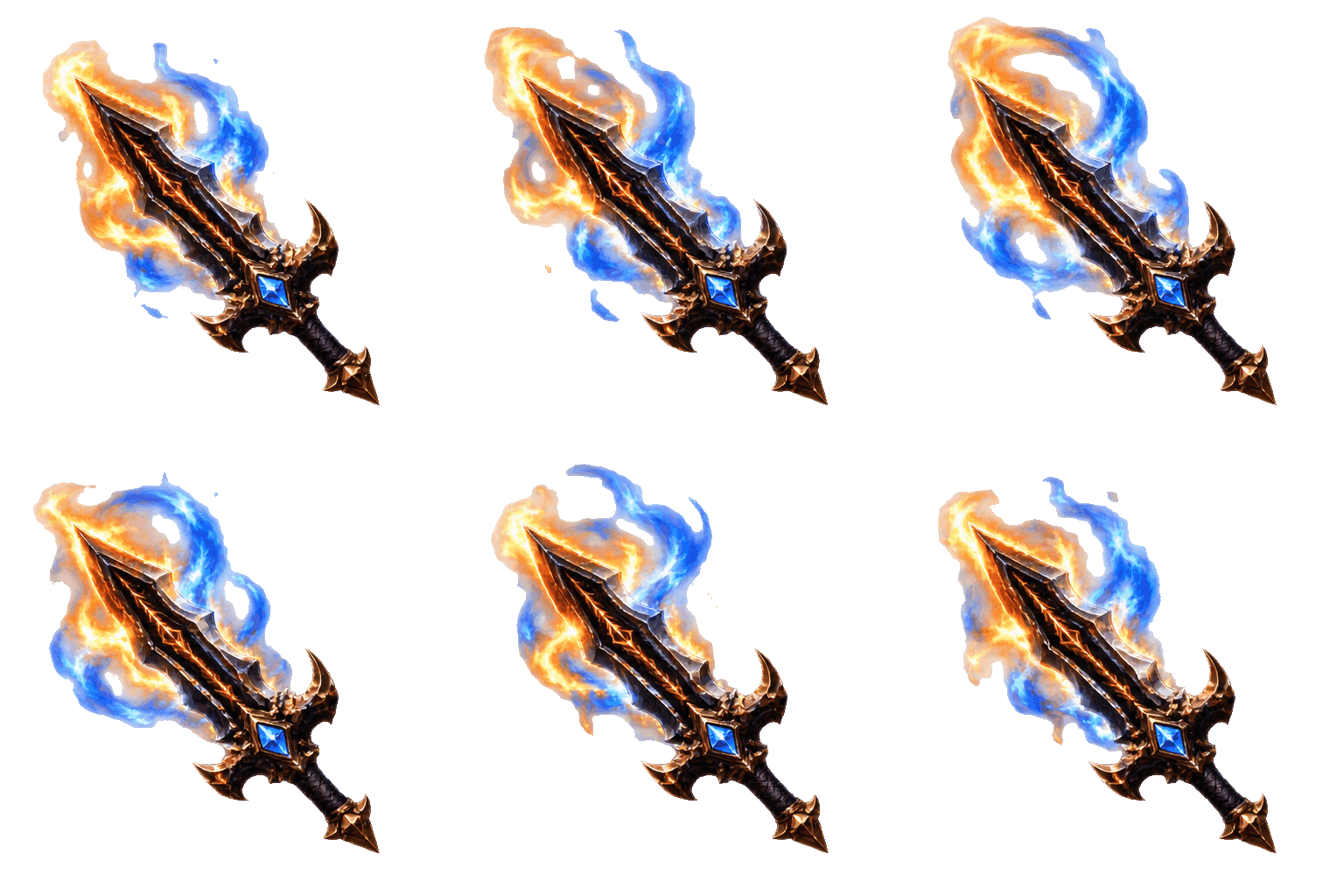 A · Fire sword: sheet → GIF "512x512" · "8 frames" · "1.28 s"Author: @hAru_mAki_ch · Source: X workflow |
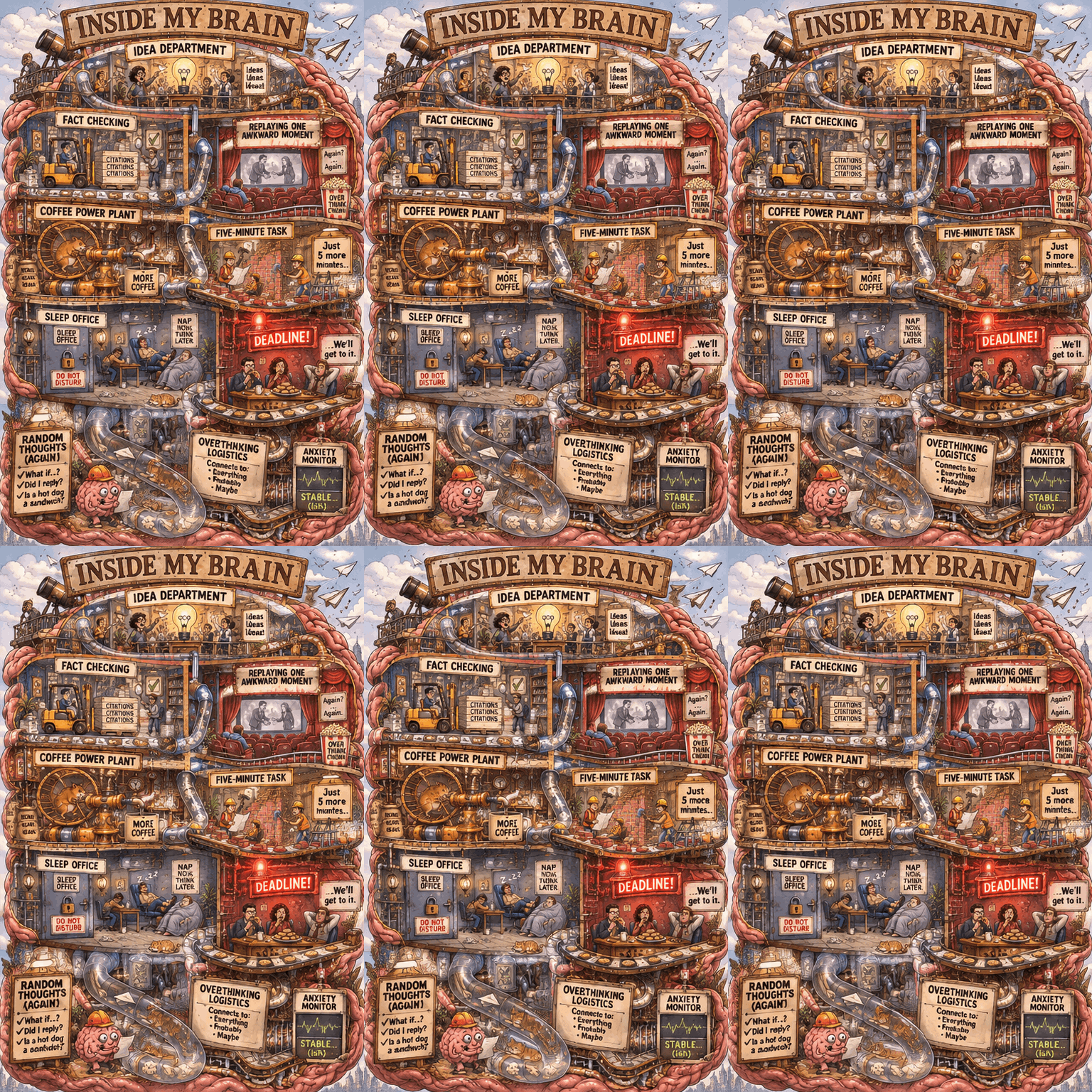 B · Brain office: image → website "512x768" · "9 frames" · "1.8 s"Curated animation · Concept: u/Ohsusannamarie |
See creative workflows for the commands and local demos. GitHub displays HTML source; download the repo and open the demos in a browser, or run a local server. The still images and full gallery continue below.
A · Fire sword: sheet → GIF · No. 171
An animation sprite sheet for a fantasy desktop cursor, inspired by a flaming-sword mouse pointer. Exactly 8 frames in a 4-column by 2-row uniform grid, read left to right then top to bottom. Canvas 2048 by 1024, each cell exactly 512 by 512. Transparent background, no gutters, no borders, no text, no labels. In every cell the same small ornate obsidian sword points diagonally toward the upper-left. Its sharp tip is fixed at cell coordinate (100,100), blade geometry and position identical in every frame. Bright amber and electric-blue flame curls around the blade, progressing smoothly through eight phases and returning to the initial shape at the loop boundary. The blade stays still; only flames, a few sparks and reflected light move. Keep all effects within the middle 360 by 360 pixels of each cell. Crisp illustrated game-UI asset, luminous edges, convincing metallic highlights, strong silhouette, no character, no duplicate swords within a cell. Do not draw checkerboards; use actual transparency.
gpt-image --model gpt-image-2.6-flare -p "" --size 2048x1024 --quality high --background transparent --format png --moderation auto -f sheet.png
gpt-image animate --sheet sheet.png --columns 4 --rows 2 --duration 160 \
  -f cursor.gif --preview player.html --title "Emberglass cursor"
B · Brain office: image → website · No. 167
Animate this exact illustrated brain-office cutaway as a short seamless looping GIF. Keep the camera, room layout, all signs and lettering fixed. Use small motions: the hamster turns the coffee wheel, tiny workers move papers along the conveyor, one paper airplane drifts near the roof, the red DEADLINE lamp gently blinks while the committee keeps eating biscuits. Preserve the drawing style and character identities. Most of the image stays still. End in the starting state. Return a single animated scene, not a grid or storyboard. No new text.
gpt-image --model gpt-image-2.6-flare \
  -i docs/infographics-field-guides/overthinking-departments-26.png \
  -p "" --format gif --frames 9 --frame-duration 200 \
  --size 512x768 --quality medium -f brain-office.gif
The sword tip drifts slightly, so it is an animation asset rather than a registered system cursor. Small lettering changes in the brain animation; the webpage uses real HTML for room names and descriptions. The local player supports pause, frame scrubbing, speed changes and download. It does not repair inconsistent generated frames.
We tried five ideas from X and Reddit with gpt-image-2.6-flare at high quality. Click an image for the original PNG, or open the prompts below to see the sources and our adaptations.
 A · Failed camera roll "864x1536" · "high" · "X"Author: @8co28 |
 B · Cyber engineer's inventory "1024x1536" · "high" · "X"Author: @chachaai_jp |
 C · Inside an overthinker's brain "1024x1536" · "high" · "Reddit"Author: u/Ohsusannamarie |
 D · The five-minute fix "1024x1536" · "high" · "Reddit"Author: u/Ohsusannamarie |
 E · Flat-pack dragon assembly "1024x1536" · "high" · "Reddit"Author: u/Mary_ry |
A and B use No. 31 · Ling Yuan's character sheet, with the reference prompt credited to @MANISH1027512. Some source posts predate 2.6. We generated the images shown here.
A · Failed camera roll · No. 164
Use the adult 26-year-old character in the reference sheet. 素人の失敗写真の数々、3x3、9:16。
gpt-image --model gpt-image-2.6-flare -i docs/character-design/character-sheet.png \
  -p "" --size 864x1536 --quality high -f docs/photography/failed-camera-roll-26.png
B · Cyber engineer's inventory · No. 166
Use the fictional adult 26-year-old character in the reference sheet. このキャラのカバンの中身を紹介する画像を作成して。キャラの性格が伝わる構成、モダンなソシャゲのインベントリ画面のようなデザイン。 Keep this tasteful and non-explicit. Use English for item labels. Show a densely packed inventory with visually distinct items and short humorous descriptions. Portrait 2:3.
gpt-image --model gpt-image-2.6-flare -i docs/character-design/character-sheet.png \
  -p "" --size 1024x1536 --quality high -f docs/gaming/engineer-inventory-26.png
C · Inside an overthinker's brain · No. 167
An elaborate illustrated cutaway of a fictional overthinker’s brain shaped like a chaotic six-storey office building. Title: INSIDE MY BRAIN. Each room has its own tiny employees, machines, incident and readable short sign. Top: IDEA DEPARTMENT launches paper airplanes into neighbouring offices. FACT CHECKING uses forklifts to move citation folders. REPLAYING ONE AWKWARD MOMENT has a cinema showing the same handshake. COFFEE POWER PLANT is a hamster-wheel espresso engine. FIVE-MINUTE TASK has construction workers expanding into adjacent rooms. SLEEP OFFICE is locked while employees nap in the corridor. A red deadline alarm is ignored by a committee eating biscuits. Draw absurd connections between these departments with pneumatic tubes, stairs and conveyor belts. Crisp editorial pen illustration with rich muted colour, numerous tiny visual jokes, large legible headings, portrait composition, fully illustrated rather than a chart of empty boxes.
gpt-image --model gpt-image-2.6-flare --moderation auto \
  -p "" --size 1024x1536 --quality high -f docs/infographics-field-guides/overthinking-departments-26.png
D · The five-minute fix · No. 168
A witty six-panel editorial comic on one portrait page, two columns by three rows. Title: JUST A FIVE-MINUTE FIX. Same fictional adult developer, age 30, round glasses, mustard hoodie in every panel. Panel 1: relaxed at a tidy laptop, a tiny task card says CHANGE BUTTON COLOR. Panel 2: opens a cupboard labelled CSS, an avalanche of tangled wires falls out. Panel 3: inspects a small bug with a magnifier, behind it towers a dinosaur labelled LEGACY. Panel 4: now wearing a hard hat, demolishes the room, sign REBUILD EVERYTHING. Panel 5: midnight, exhausted, surrounded by twelve glowing monitors and sticky notes, tiny cat asleep on keyboard, caption THREE DAYS LATER. Panel 6: proud before the same laptop, button is exactly its original blue, small speech bubble IT WAS FINE BEFORE. Clear expressive physical comedy, detailed backgrounds that escalate, crisp ink and flat spot colours on warm white paper, readable exact short text, no extra panels.
gpt-image --model gpt-image-2.6-flare --moderation auto \
  -p "" --size 1024x1536 --quality high -f docs/anime-manga/five-minute-fix-26.png
E · Flat-pack dragon assembly · No. 169
A deadpan flat-pack furniture assembly instruction sheet for assembling a living dragon, named DRAKON. Six numbered illustrated stages, black technical line art on warm white paper, small mustard-yellow warning boxes. At the top a neat parts inventory: dragon head, two wings, coiled tail, four feet, huge ribbed body, bag of tiny screws, one comically small hex key. Step 1 a cheerful stick person sorts parts. Step 2 two people struggle to align a wing. Step 3 one extra screw remains. Step 4 assembled dragon sneezes a tiny flame onto the instruction page. Step 5 dragon eats the hex key. Step 6 dragon has curled up on the sofa, crushing it, while owner calmly phones support. Tiny alternate wrong-way wing diagram crossed out. Bottom warning reads WARNING: DO NOT FEED AFTER ASSEMBLY. Precise readable diagrams, escalating visual comedy, clean generous gutters, portrait layout. Fictional fantasy assembly only, no realistic dangerous instructions. Do not use a real company logo.
gpt-image --model gpt-image-2.6-flare --moderation auto \
  -p "" --size 1024x1536 --quality high -f docs/infographics-field-guides/flatpack-dragon-26.png
A few details missed the brief. B uses the company name as the character's name. D never shows the original button colour, so the dialogue carries the final joke. The run record covers these checks. You can also find the shared room and night-market seek-and-find attempt in the Reference Gallery.
These earlier samples use gpt-image-2.5-sunburst at 2048x2048, high: a mechanical watch with numbered parts, and a multi-storey cafe district opened up to reveal its interiors.
 A · Meridian 8 exploded assembly 2048x2048 · high · Curated |
 B · Night cafe cutaway 2048x2048 · high · Curated adaptation |
A · No. 113 · Prompt
Create a premium technical exploded-view illustration of a fictional mechanical wristwatch called the Meridian 8, centered on a dark slate background with fine blueprint grid accents. Show the watch components separated vertically with precise spacing: sapphire crystal, dial, hands, chapter ring, movement plates, escapement, balance wheel, mainspring barrel, case, crown, and leather strap sections. Use realistic brushed steel, brass, ruby jewel accents, and deep navy dial details. Add crisp callouts and labels with the in-image text "Meridian 8", "Exploded Assembly", "42 mm Case", "25 Jewels", and "Power Reserve 72 h". Include numbered callouts "01" through "10" with short labels like "Balance Wheel", "Mainspring Barrel", and "Sapphire Crystal". The result should be highly detailed, technically believable, sharply rendered, and suitable for an industrial design plate with clean hierarchy, exact labeling, and refined material realism.
B uses the reference from No. 54, keeping the overall street layout while reworking the interiors, floors and lighting. Reference attribution: EvoLinkAI · Source.

B · No. 54 · Edit prompt
Use the reference image as the layout anchor for a richly detailed isometric two-block cafe district at blue hour. Keep the street footprint, corner cafe, neighboring bookstore, bakery and fountain plaza recognizable. Transform it into a three-storey architectural cutaway diorama with coherent 30-degree isometric geometry.
Open the front-facing walls to reveal the cafe espresso bar and upstairs jazz lounge; bookshelves, reading nooks and a spiral staircase in the bookstore; pastry cases and a working oven in the bakery. Add a rooftop glass greenhouse, tiny terraces, copper plumbing, tiled stairs, balconies, hanging plants and warm lights visible through rain-speckled windows. At street level show wet cobbles, bicycles, the coffee cart, varied miniature pedestrians and reflections around the fountain. Every floor, doorway and staircase should connect plausibly.
Use warm amber interiors against deep teal evening shadows, tactile brick, glazed tiles, glass and brushed brass. Preserve crisp detail throughout the scene, with a clean dark navy background and room around the floating diorama. Give the scene depth through cutaway rooms and layered architecture. Use restrained, readable storefront lettering: "NIGHT OWL CAFE", "OPEN BOOKS", and "DAWN BAKERY". Keep the composition square and visually balanced.
See the sample record for settings, inputs and review notes.
@LunarXuan contributed Get Prompt from Image. Give a vision-capable agent a reference image, extract a prompt, then pass it to gpt-image or another generator. Below are the contributor's reference and generated result.
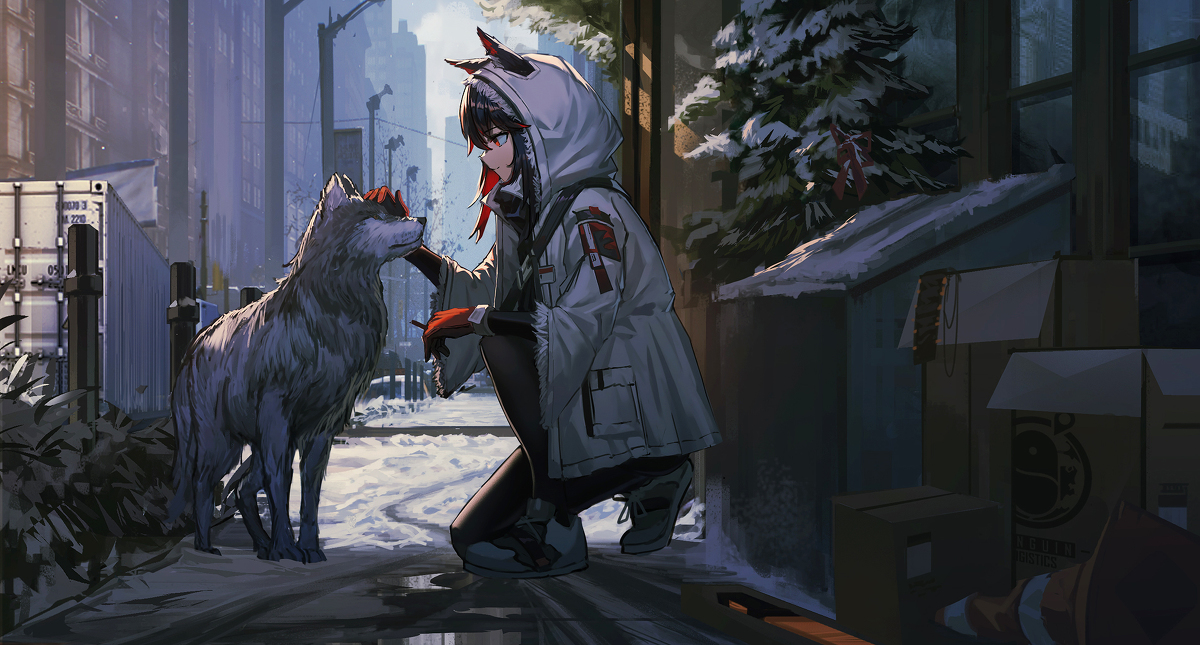 Reference image · Contributor-provided |
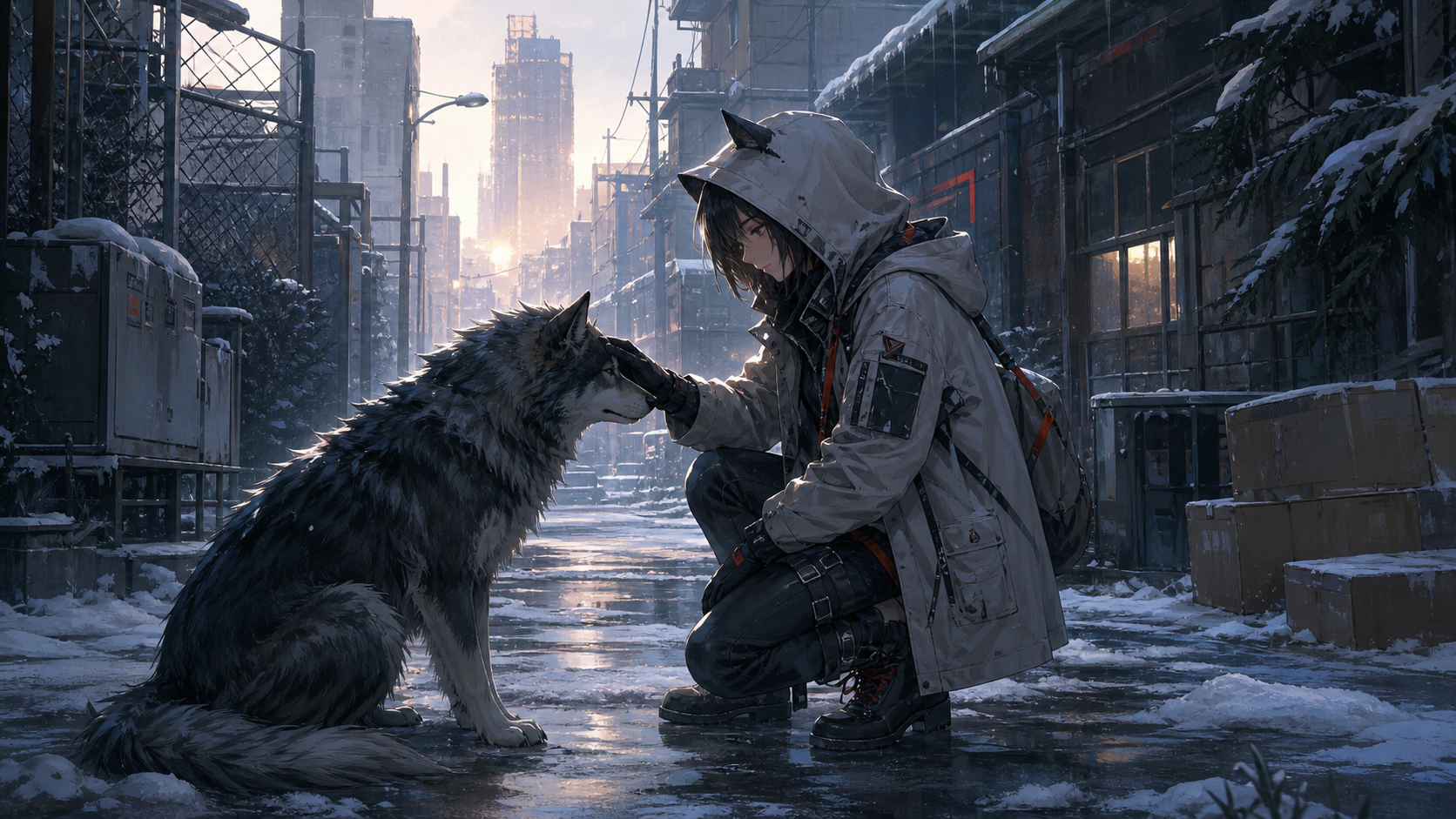 Generated result · ImageGen output |
Attach an image and invoke the skill with a slash command, $get-prompt-from-image, or plain language:
/get-prompt-from-image
Extract a reusable English positive prompt and a targeted negative prompt from this image, then recreate it with gpt-image.
Positive Prompt
~~~text A highly polished semi-realistic Japanese narrative illustration rendered in a painterly digital style, using varied brush widths, a combination of hard edges and soft transitions, restrained contour lines, and controlled surface texture. The image should feel like a cold cinematic game-concept artwork. Use a wide 16:9 composition with strong depth in a snowy urban alley, where the snow-covered road narrows toward a distant vanishing point near the center. Place a large fluffy dark blue-gray wolfdog in the left foreground, shown in side profile facing right with its head raised, interacting with a hooded young woman kneeling near the center-right. She crouches in the snow facing left, gently touching the wolfdog’s muzzle or forehead with one gloved hand while the other rests near her knee for balance, creating a restrained and intimate gesture. She wears an oversized pale-gray winter hooded jacket with pointed ear-like details on top, dark gray panels, pockets, straps, and small muted red-orange accents, over black clothing, fitted black pants, and heavy dark boots. Short black or deep-brown hair falls from beneath the hood; her face is partly shadowed as she looks down at the wolfdog with a quiet, tired, yet gentle expression. Render the wolfdog’s fur with layered directional brushstrokes, making the back, neck, and tail thick and voluminous, with cool blue-gray shadows, pale highlights, and a subtle rim light along the silhouette. On the left, include metal fencing, utility boxes, and dense dark shrubs; in the distance, show tall urban buildings, street lamps, utility poles, and a blue-gray sky. On the right, include dark building facades, windows, snow-covered roof edges, evergreen branches, and foreground cardboard boxes and industrial clutter. Any environmental labels should remain blurred graphic marks with no readable text. Let the main light enter from the distant upper-left side of the alley, combining cold blue ambient shadows with warm golden reflections in the distance. Add subtle rim light to the snow, the woman, and the wolfdog, with medium-high contrast and warm orange clothing details acting as focal accents. Snow, slush, and shallow puddles in the foreground should show damp reflections. Use atmospheric perspective to soften distant buildings while keeping the woman and wolfdog clear. Establish depth through foreground, middle ground, background, occlusion, and perspective lines rather than strong blur. The mood is loneliness, trust, and a brief moment of tenderness in a frozen city. Preserve rough painterly strokes, cool-warm contrast, cinematic composition, and refined post-processing. Clearly remain a 2D semi-realistic painterly illustration, not photography, pure flat vector art, or 3D rendering. ~~~
Negative Prompt
~~~text photorealistic, 3D render, flat vector style, pure cel s
→ →
 →
 →→
 →
 →
 →