1
 →

Local UI to run and train LLMs and diffusion models. Supports GGUF, MLX, Qwen3.8, DeepSeek-V4.1, MiniMax-H3, Gemma 4, FLUX and more.
unslothai/unsloth is an open-source project on GitHub, mainly written in Python. Local UI to run and train LLMs and diffusion models. Supports GGUF, MLX, Qwen3.8, DeepSeek-V4.1, MiniMax-H3, Gemma 4, FLUX and more. It currently holds 79,276 stars and 7,382 forks with 490 open issues, and was last pushed on 2026-11-10 (repository created 2023-11-29).
Git Homed tracks it on the Image Trending board and on the AI Image Trending list.

Features • Quickstart • Notebooks • Documentation
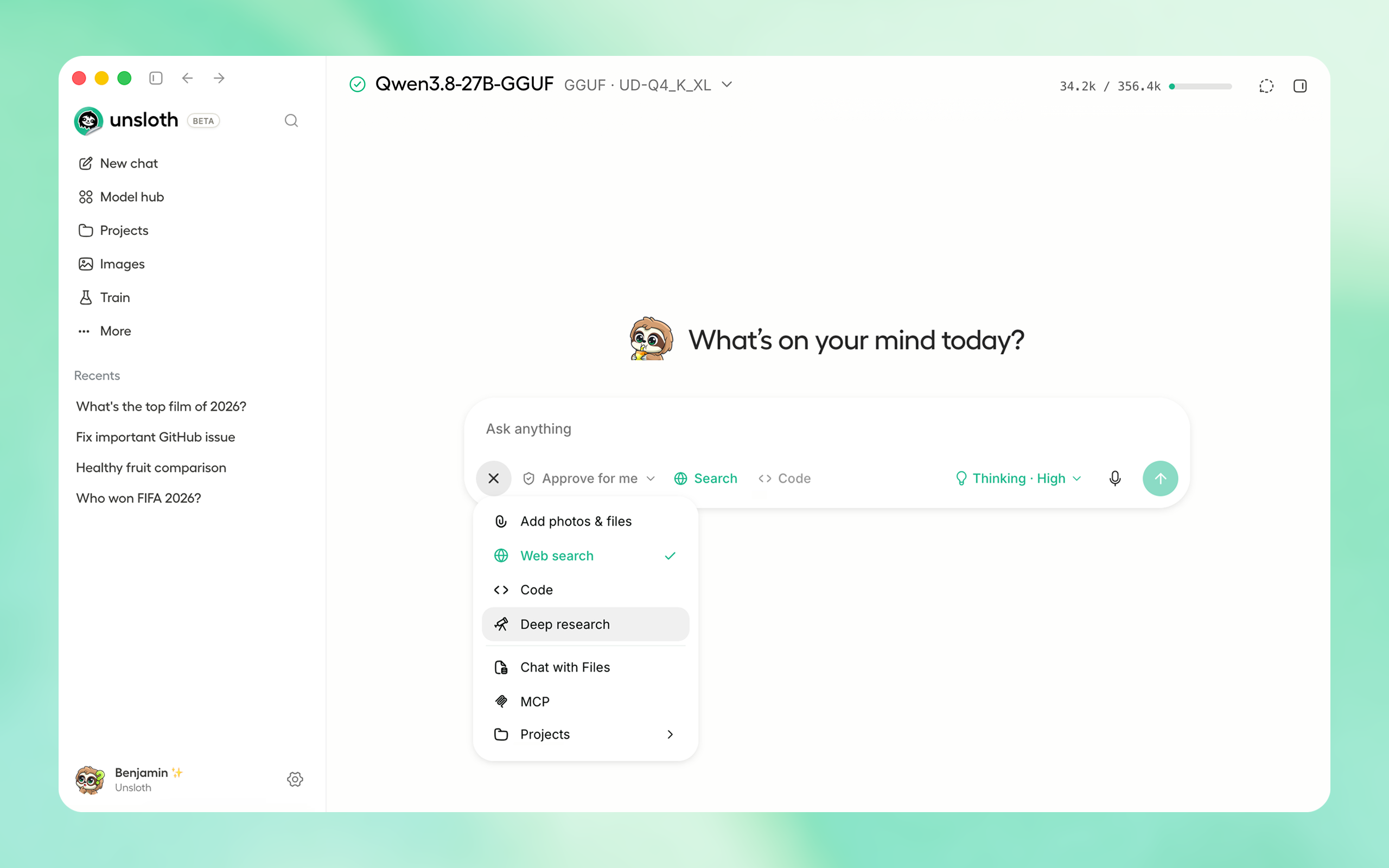
| Platform | Link |
| Windows | Download |
| macOS | Download |
| Linux / Ubuntu (deb) | Download |
| Linux / Ubuntu (ARM64) (deb) | Download |
| Linux (AppImage) | Download |
| Windows (ARM64) | Download |
Download from Unsloth or GitHub Releases.
Or if you prefer to install manually:
curl -fsSL https://unsloth.ai/install.sh | sh
irm https://unsloth.ai/install.ps1 | iex
The Unsloth Docker image unsloth/unsloth is available on Docker. Read guide.
brew install --cask unsloth
winget install --id UnslothAI.Unsloth -e
Unsloth Start connects Claude Code, Codex and other agents to local models with one command.
unsloth start claude --model unsloth/Qwen3.8-27B-GGUF:UD-Q4_K_XL
| Agent | Command |
| --- | --- |
| Claude Code | unsloth start claude |
| OpenAI Codex | unsloth start codex |
| Visual Studio Code | unsloth start vscode |
| DeepSeek Harness | unsloth start dsh |
| OpenCode | unsloth start opencode |
| Hermes Agent | unsloth start hermes |
| Pi | unsloth start pi |
| OpenClaw | unsloth start openclaw |
| Mistral Vibe | unsloth start vibe |
| Platform | Link |
| Windows | Download |
| macOS | Download |
| Linux / Ubuntu (deb) | Download |
| Linux / Ubuntu (ARM64) (deb) | Download |
| Linux (AppImage) | Download |
| Windows (ARM64) | Download |
To choose Desktop's local HTTP port, set UNSLOTH_DESKTOP_PORT=9000 in the environment that launches the app, then fully quit and reopen Desktop. Unset or empty keeps the default port 8888. If the selected port is busy, Desktop tries the next 20 ports. Choose a port between 1024 and 65515; Desktop rejects ranges containing a browser-restricted port. This setting applies to Desktop, including backend restarts after updates; it does not change the web UI's unsloth studio -p option or the separate LAN access port.
curl -fsSL https://unsloth.ai/install.sh | sh
irm https://unsloth.ai/install.ps1 | iex
brew install --cask unsloth
unsloth/unsloth``. On Linux and Mac, set up GPU access once with
curl -fsSL https://raw.githubusercontent.com/unslothai/unsloth/main/docker/install_nvidia_toolkit.sh -o install_nvidia_toolkit.sh && sudo -E bash install_nvidia_toolkit.sh
Linux / WSL (Bash):
# for a public Cloudflare HTTPS link: use  -e UNSLOTH_STUDIO_SECURE=1  instead of -p 8000:8000, and  -p 127.0.0.1:8888:8888  instead of -p 8888:8888
docker run -d --name unsloth --gpus all --ipc=host \
  -p 8000:8000 -p 8888:8888 \
  -v "$PWD":/workspace/host \
  -v unsloth-workspace:/workspace \
  -v "$HOME/.cache/huggingface":/workspace/.cache/huggingface \
  -v unsloth-studio:/opt/unsloth-studio \
  unsloth/unsloth && docker logs -f unsloth
unsloth/unsloth:core tag; all tags and options are on Docker Hub.unsloth/unsloth-rocm.
---
unsloth studio
unsloth studio --secure
--disable-tools when exposing Unsloth.
Global HTTPS Access: Creates a free Cloudflare link that serves Unsloth - you can access the link globally (even on your phone!)
unsloth studio --secure
-H 0.0.0.0 and different ports also work:
unsloth studio -H 0.0.0.0 -p 8888
Settings > API keys > LAN access
Your own reverse proxy or custom domain (Cloudflare Named Tunnel, nginx, Caddy) running on the same computer: Unsloth Desktop only serves its web UI to a proxy for hostnames you list (comma separated), so set them, then quit and reopen it:
export UNSLOTH_STUDIO_PROXY_HOSTS=studio.example.com            # Linux: start Unsloth Desktop from this shell
launchctl setenv UNSLOTH_STUDIO_PROXY_HOSTS studio.example.com  # macOS
setx UNSLOTH_STUDIO_PROXY_HOSTS studio.example.com              # Windows
Host (cloudflared's default, so leave its HTTP Host Header override unset) or as X-Forwarded-Host. Sign in with the password from Settings > Remote access > Remote password.
To serve HTTPS with your own certificate without passing --ssl-certfile/--ssl-keyfile (Docker, systemd), set both variables before unsloth studio; passing either flag ignores them:
UNSLOTH_STUDIO_SSL_CERTFILE=/path/to/full-chain.pem \
UNSLOTH_STUDIO_SSL_KEYFILE=/path/to/private-key.pem \
unsloth studio
--secure, --cloudflare, or a non-loopback -H) asks once at the terminal for a new admin password. Ctrl+C there aborts the launch rather than exposing the auto-generated one; set a password non-interactively instead, or use -H 127.0.0.1 to stay off the network.
Headless starts:
UNSLOTH_STUDIO_PASSWORD='your-strong-password' unsloth studio --secure # via env var
unsloth studio reset-password
curl -LsSf https://astral.sh/uv/install.sh | sh
uv venv unsloth_env --python 3.13
source unsloth_env/bin/activate
uv pip install unsloth --torch-backend=auto
winget install -e --id Python.Python.3.13
winget install --id=astral-sh.uv  -e
uv venv unsloth_env --python 3.13
.\unsloth_env\Scripts\activate
uv pip install torchao
uv pip install unsloth --torch-backend=auto
--torch-backend looks for it only on the PyTorch index, which has no recent Windows torchao, so a one-step install silently resolves an old Unsloth.
Train for free with our notebooks. Read our guide. Add dataset, run, then deploy your trained model.
| Model | Free Notebooks | Performance | Memory use | |-----------|---------|--------|----------| | Unsloth Studio | ▶️ Start for free | | | | Decision model (Qwen3.5-4B) | ▶️ Start for free-Decision.ipynb) | 1.5x faster | 60% less | | Gemma 4 (E2B) | ▶️ Start for free-Vision.ipynb) | 1.5x faster | 50% less | | Qwen3.5 (4B) | ▶️ Start for free_Vision.ipynb) | 1.5x faster | 60% less | | gpt-oss (20B) | ▶️ Start for free-Fine-tuning.ipynb) | 2x faster | 70% less | | Qwen3.5 GSPO | ▶️ Start for free_Vision_GRPO.ipynb) | 2x faster | 70% less | | gpt-oss (20B): GRPO | ▶️ Start for free-GRPO.ipynb) | 2x faster | 80% less | | Qwen3: Advanced GRPO | ▶️ Start for free-GRPO.ipynb) | 2x faster | 70% less | | embeddinggemma (300M) | ▶️ Start for free.ipynb) | 2x faster | 20% less | | Llama 3.1 (8B) Alpaca | ▶️ Start for free-Alpaca.ipynb) | 2x faster | 70% less | | Llama 3.2 Conversational | ▶️ Start for free-Conversational.ipynb) | 2x faster | 70% less | | Orpheus-TTS (3B) | ▶️ Start for free-TTS.ipynb) | 1.5x faster | 50% less |
main branch, which is the latest (nightly) source.
git clone https://github.com/unslothai/unsloth
cd unsloth
./install.sh --local
unsloth studio -p 8888
UNSLOTH_STUDIO_HOME:
UNSLOTH_STUDIO_HOME="$PWD/.studio" ./install.sh --local
UNSLOTH_STUDIO_HOME="$PWD/.studio" unsloth studio -p 8888
cd unsloth && git pull
./install.sh --local
unsloth studio -p 8888
main branch, which is the latest (nightly) source.
git clone https://github.com/unslothai/unsloth.git
cd unsloth
Set-ExecutionPolicy -Scope Process -ExecutionPolicy RemoteSigned
.\install.ps1 --local
unsloth studio -p 8888
UNSLOTH_STUDIO_HOME:
$env:UNSLOTH_STUDIO_HOME="$PWD\.studio"; .\install.ps1 --local
$env:UNSLOTH_STUDIO_HOME="$PWD\.studio"; unsloth studio -p 8888
cd unsloth; git pull
.\install.ps1 --local
unsloth studio -p 8888
Skip PyTorch (GGUF-only mode):
curl -fsSL https://unsloth.ai/install.sh | UNSLOTH_NO_TORCH=1 sh
$env:UNSLOTH_NO_TORCH=1; irm https://unsloth.ai/install.ps1 | iex
Skip the post-install prompt that starts Unsloth (useful for automated installs):
curl -fsSL https://unsloth.ai/install.sh | UNSLOTH_SKIP_AUTOSTART=1 sh
$env:UNSLOTH_SKIP_AUTOSTART=1; irm https://unsloth.ai/install.ps1 | iex
Keep the install-time package cache under the Unsloth Studio directory instead of reusing an existing uv cache. Downloads are slower the first time, and an explicit UV_CACHE_DIR still wins over this:
curl -fsSL https://unsloth.ai/install.sh | UNSLOTH_ISOLATE_UV_CACHE=1 sh
$env:UNSLOTH_ISOLATE_UV_CACHE=1; irm https://unsloth.ai/install.ps1 | iex
--isolated-uv-cache:
./install.sh --local --isolated-uv-cache
.\install.ps1 --local --isolated-uv-cache
Discard the previous environment immediately when reinstalling, instead of keeping a copy until the new one works. A reinstall normally holds both at once, so it needs room for two; this needs room for one, at the cost of not being able to undo a failed install:
curl -fsSL https://unsloth.ai/install.sh | UNSLOTH_INSTALL_NO_ROLLBACK=1 sh
$env:UNSLOTH_INSTALL_NO_ROLLBACK=1; irm https://unsloth.ai/install.ps1 | iex
--no-rollback:
./install.sh --local --no-rollback
.\install.ps1 --local --no-rollback
Pinning the Python version:
curl -fsSL https://unsloth.ai/install.sh | UNSLOTH_PYTHON=3.12 sh
$env:UNSLOTH_PYTHON='3.12'; irm https://unsloth.ai/install.ps1 | iex
Install to a custom location with UNSLOTH_STUDIO_HOME:
curl -fsSL https://unsloth.ai/install.sh | UNSLOTH_STUDIO_HOME=/abs/path sh
$env:UNSLOTH_STUDIO_HOME='C:\path'; irm https://unsloth.ai/install.ps1 | iex
Point the frontend build at a corporate npm mirror/proxy with UNSLOTH_NPM_REGISTRY:
UNSLOTH_NPM_REGISTRY=https://artifactory.example.com/api/npm/npm/ ./install.sh --local
$env:UNSLOTH_NPM_REGISTRY='https://artifactory.example.com/api/npm/npm/'; .\install.ps1 --local
Cap Unsloth's native CPU thread pools on high-core hosts: UNSLOTH_CPU_THREADS=8 unsloth studio -p 8888.
Pick the llama.cpp build GGUF chat runs on during installation. PyTorch is picked separately from your GPU, so this does not change it:
export UNSLOTH_LLAMA_CPP_BACKEND=vulkan   # or cpu, cuda, rocm, auto
curl -fsSL https://unsloth.ai/install.sh | sh
$env:UNSLOTH_LLAMA_CPP_BACKEND="vulkan"   # or cpu, cuda, rocm, auto
irm https://unsloth.ai/install.ps1 | iex
To choose PyTorch yourself, pin its index:
curl -fsSL https://unsloth.ai/install.sh | UNSLOTH_TORCH_INDEX_FAMILY=cpu sh # or a family like rocm7.2
curl -fsSL https://unsloth.ai/install.sh | UNSLOTH_NO_TORCH=1 sh
Setup also installs audio.cpp (prebuilt by unslothai/audio.cpp), which runs the audio.cpp speech, music and speech-to-text models on the Audio page, in Voice settings and behind /v1/audio/*. It is optional and never blocks setup:
UNSLOTH_SKIP_AUDIO_CPP_INSTALL=1 skips it.UNSLOTH_AUDIO_CPP_ACCELERATOR=cpu (or cuda, vulkan, metal) picks the bundle instead of auto-detecting.AUDIOCPP_SERVER_PATH=/path/to/audiocpp_server uses your own build.MacOS, WSL, Linux: curl -fsSL https://raw.githubusercontent.com/unslothai/unsloth/main/scripts/uninstall.sh | sh
Windows (PowerShell): irm https://raw.githubusercontent.com/unslothai/unsloth/main/scripts/uninstall.ps1 | iex
For more info, see our docs.
You can delete old model files either from the bin icon in model search or by removing the relevant cached model folder from the default Hugging Face cache directory. By default, HF uses:
MacOS, Linux, WSL: ~/.cache/huggingface/hub/
Windows: %USERPROFILE%\.cache\huggingface\hub\
 Discord | Join Discord server |
|
 r/unsloth Reddit | Join Reddit community |
| 📚 Documentation & Wiki | Read Our Docs |
|
 Twitter (aka X) | Follow us on X |
| 🔮 Our Models→
 →
 →→
 →
 →
 →
 →