1
 →

Compress tool outputs, logs, files, and RAG chunks before they reach the LLM. 20% fewer tokens for coding agents, 60-95% fewer tokens for JSON, same answers. Library, proxy, MCP server.
headroomlabs-ai/headroom is an open-source project on GitHub, mainly written in Python. Compress tool outputs, logs, files, and RAG chunks before they reach the LLM. 20% fewer tokens for coding agents, 60-95% fewer tokens for JSON, same answers. It currently holds 78,695 stars and 6,148 forks with 485 open issues, and was last pushed on 2026-11-03 (repository created 2026-01-07).
Git Homed tracks it on the AI Agent Skills Trending board and on the AI AI Agent Skills Trending list.


Quickstart · Headroom for Teams · Install · Proof · Agents · Docs · Discord · llms.txt
AI agents / LLMs: read /llms.txt here, or fetch
the live index ·
full docs blob.
Headroom (headroom-ai on PyPI and npm) compresses everything your AI agent
reads — tool outputs, logs, RAG chunks, files, and conversation history — before
it reaches the LLM. Same answers, fewer input tokens. Measured: 21–57% fewer
input tokens on four agent scenarios, 90%+ on repeated JSON arrays and log
lines, little on prose (Proof). Compression
runs on your machine; no prompt or file content is sent anywhere to be compressed.
My app calls an LLM (Python, LangChain, LiteLLM, Agno, Strands):
pip install headroom-ai
from headroom import compress
result = compress(messages, model="gpt-4o")  # OpenAI or Anthropic message dicts
client.chat.completions.create(model="gpt-4o", messages=result.messages)
No API key, no model download, in-process. Set HEADROOM_OFFLINE=1 for a
zero-network run. Tool and assistant messages are compressed; user messages are
left alone unless you pass compress_user_messages=True.
FastAPI example ·
API reference.
TypeScript apps: npm install headroom-ai plus the proxy
(pip install "headroom-ai[proxy]", headroom proxy --port 8787); the npm SDK
sends messages to it. TypeScript quickstart
I run coding agents (Claude Code, Codex, Cursor, Copilot, OpenCode, Aider):
uv tool install --python 3.13 "headroom-ai[all]"
headroom wrap claude
Zero code changes. Agent compatibility · Proxy

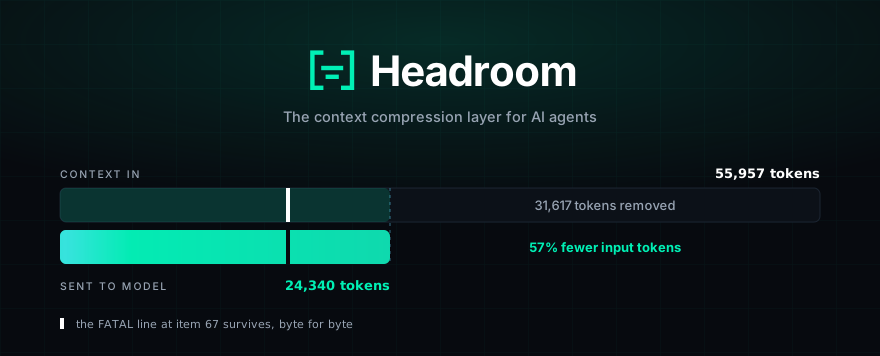
FATAL found.
compress(messages) in Python or TypeScript, inline in any app.headroom proxy --port 8787, zero code changes, any language.headroom wrap claude|codex|grok|copilot|cursor|aider|opencode|cline|continue|goose|openhands|openclaw|vibe|omp|droid|zcode in one command; undo with headroom unwrap .headroom_compress, headroom_retrieve, headroom_stats for any MCP client.headroom learn — mines failed sessions and writes corrections to CLAUDE.local.md (default, gitignored), CLAUDE.md, AGENTS.md, GEMINI.md or GROK.md. Your agent / app
(Claude Code, Cursor, Codex, LangChain, Agno, Strands, your own code…)
│ prompts · tool outputs · logs · RAG results · files
▼
┌────────────────────────────────────────────────────┐
│ Headroom (runs locally — your data stays here) │
│ ──────────────────────────────────────────────── │
│ CacheAligner → ContentRouter → CCR │
│ ├─ SmartCrusher (JSON) │
│ ├─ CodeCompressor (AST) │
│ └─ Kompress-v2-base (text, HF) │
│ │
│ Cross-agent memory · headroom learn · MCP │
└────────────────────────────────────────────────────┘
│ compressed prompt + retrieval tool
▼
LLM provider (Anthropic · OpenAI · Bedrock · …)
headroom_retrieve when it needs the full text.# 1 — Install
uv tool install --python 3.13 "headroom-ai[all]" # CLI in a self-contained env
pip install "headroom-ai[all]" # Python — ships the headroom CLI
npm install headroom-ai # TypeScript SDK only — no CLI
2 — Pick a mode
headroom deploy # turnkey local deployment + agent config
headroom wrap claude # wrap a coding agent
headroom proxy --port 8787 # drop-in proxy, zero code changes
or: from headroom import compress # inline library
3 — Check it and watch the savings
headroom doctor # health check — confirms routing works
headroom perf
headroom dashboard # live savings (proxy must be running)
from headroom import compress
from openai import OpenAI
messages = [{"role": "user", "content": "Analyze these results"}]
result = compress(messages, model="gpt-4o")
client = OpenAI()
response = client.chat.completions.create(model="gpt-4o", messages=result.messages)
print(f"Saved {result.tokens_saved} tokens ({result.compression_ratio:.0%})")
Launch a wrapped agent session each time, so the setup runs. headroom wrap
starts a local proxy and launches the agent configured to route through
Headroom. Add --code-memory serena to also install
Serena for semantic code navigation (off
by default). For Claude Code, Serena is registered for the wrapped project only
(as a local-scope MCP server in ~/.claude.json); use --code-memory-scope user
to make it available in every project. headroom unwrap removes either registration.
headroom wrap ... is session-scoped: its proxy exits with the wrapped agent.
For a proxy that survives reboots, use the turnkey headroom deploy command.
Use headroom install apply when you need to choose a specific persistent
service, scheduled task, Docker runtime, scope, or provider target; see the
persistent installs guide.
The headroom CLI ships only in the PyPI package. The npm headroom-ai package
is the TypeScript SDK — a library you import
(import { compress } from 'headroom-ai') — and provides no headroom command.
Four scenarios built from real MCP server output formats, measured with the
provider tokenizer and the shipped compress() at its default configuration.
Seeded and offline, so you get the same numbers we did:
uv run python benchmarks/index_proof_table.py --seed 20260902
| Scenario | Before | After | Saved | |---|---:|---:|---:| | Code search (100 results) | 17,199 | 13,597 | 21% | | SRE incident debugging | 55,957 | 24,340 | 57% | | Codebase exploration | 58,801 | 33,895 | 42% | | GitHub issue triage | 46,067 | 32,429 | 30% |
Savings scale with how repetitive the payload is. Repeated JSON arrays and log
lines clear 90% in benchmarks/bench_latency.py; prose and already-dense output
compress very little. Run headroom savings against your own traffic for the
number that applies to you.
Compression costs well under a millisecond — 0.21 ms p50 on a 10K-token JSON search result, 1.4 ms at 100K tokens — so it does not show up in agent latency.
Accuracy. python -m headroom.evals suite --tier 1:
| Benchmark | Category | N | Baseline | Headroom | Delta | |---|---|---:|---:|---:|---| | GSM8K | Math | 100 | 0.870 | 0.870 | ±0.000 | | TruthfulQA | Factual | 100 | 0.530 | 0.560 | +0.030 | | SQuAD v2 | QA | 100 | — | 97% | at 19% compression | | BFCL | Tools | 100 | — | 97% | at 32% compression |
At N=100 a delta of ±0.03 falls inside the confidence interval, so TruthfulQA shows no detectable difference rather than an improvement. Methodology →
Everything above shrinks the prompt you send. You also pay for every token the model writes back, and on Opus-class models output costs 5× input. Much of that output is ceremony: "Great, let me…" preambles, code re-printed straight back at you, and deep reasoning spent on routine steps like reading a file.
Headroom trims it from the proxy, with no change to your code:
/v1/messages and to OpenAI-compatible
/v1/chat/completions and /v1/responses, with the same output_shaper:*
labels on all paths.
export HEADROOM_OUTPUT_SHAPER=1     # off by default
headroom proxy --port 8787
Already running a proxy? These switches are read live on every request, so
a proxy that headroom wrap reused rather than started would not see a value
you export afterwards — its environment was snapshotted at launch. `headroom
wrap` hot-syncs your current settings to the running proxy over a loopback
POST /admin/runtime-env, so they take effect with no restart and no droppedrequests. On a shared proxy these overrides are global; the last explicit
setting wins.
Terseness you didn't have to configure. People rarely state how terse they
want answers — they show it, by interrupting long replies or moving on before
they could have read them. headroom learn --verbosity reads past sessions and
picks the level:
headroom learn --verbosity            # dry run — preview what it found
headroom learn --verbosity --apply    # save it and apply it to the running proxy
A proxy in cache mode (the default) never re-reads the learned level, because a
level that changes mid-conversation would bust the prompt cache. There --apply
pins it with HEADROOM_VERBOSITY_LEVEL; set that variable yourself to keep it
after a restart.
Measuring it. Output savings are counterfactual — we never see what the model would have written — so Headroom reports an estimate with a confidence range and labels it as one:
headroom output-savings
Reduction: 31.7%  (95% CI 27.7% … 35.7%)   [estimated]
For a measured number instead, hold out 10% of conversations as an unshaped
control: export HEADROOM_OUTPUT_HOLDOUT=0.1. The dashboard's Output Tokens
Saved card then reads measured rather than estimated, with the band.
| Agent | headroom wrap | Notes |
|---|:---:|---|
| Claude Code | ✅ | --memory · --code-graph · --1m · --tool-search |
| Codex | ✅ | shares memory with Claude |
| Grok CLI | ✅ | routes via GROK_MODELS_BASE_URL |
| Cursor | Manual setup | starts the proxy and prints base URLs for Cursor settings |
| Aider | ✅ | starts proxy + launches |
| Copilot CLI | ✅ | starts proxy + launches |
| VS Code Copilot | ✅ | transparent proxy; keeps the selected model |
| OpenClaw | ✅ | installs as a ContextEngine plugin |
| OpenCode | ✅ | injects config · starts proxy + launches [^third-party-upstream] |
| Cline | ✅ | starts proxy + injects config |
| Continue | ✅ | starts proxy + injects config |
| Goose | ✅ | starts proxy + launches |
| OpenHands | ✅ | starts proxy + launches |
| Mistral Vibe | ✅ | starts proxy + launches |
| Oh My Pi | ✅ | Anthropic + OpenAI/Codex · injects config · starts proxy + launches |
| Factory Droid | ✅ | routes via FACTORY_API_BASE_URL; Anthropic-model turns compressed, other Factory traffic passed through |
| Cortex Code | Library only | 60–65% savings in library mode; no wrap |
| Kimi CLI | ✅ | OAuth bearer forwarded — log in once |
| ZCode | ✅ | starts the proxy and prints base URLs for ZCode settings |
[^third-party-upstream]: headroom wrap routes OpenAI-compatible traffic to the default upstream (https://api.openai.com/v1). For a third-party OpenAI-compatible provider (DeepSeek, Together, OpenRouter, a self-hosted gateway), pass --openai-api-url https://api.deepseek.com/v1 — or set OPENAI_TARGET_API_URL before wrapping — otherwise your provider key is sent to OpenAI and rejected with 401 Incorrect API key provided. See OpenCode + DeepSeek.
Any OpenAI-compatible client works through headroom proxy. MCP-native clients:
headroom mcp install. Undo durable wrapping with headroom unwrap
(claude, copilot, codex, grok, kimi, omp, opencode, openclaw,
zcode). Registry authors should use the canonical server.json
rather than reconstructing the headroom mcp serve contract from prose.
For Anthropic /v1/messages, --mode cache skips automatic --memory context injection so the provider prefix remains stable. OpenAI chat/responses and Gemini append memory to the live-zone tail. Use --mode token when you need automatic memory context on the Anthropic path.
Headroom can route Copilot CLI subscription traffic through the local proxy:
headroom copilot-auth login
headroom wrap copilot --subscription -- --model gpt-4o
The wrapper exchanges Headroom's reusable GitHub OAuth token for Copilot's
short-lived API token and prints the upstream endpoint as
COPILOT_PROVIDER_API_URL=... at launch. headroom copilot-auth login stores a
Headroom-specific Copilot OAuth token, rather than relying on generic GitHub or
Copilot CLI tokens that can read account metadata but are still rejected by
Copilot's token-exchange endpoint.
For GitHub Enterprise Server or a custom-domain Copilot deployment, set one of these before launching. If both are set, the URL wins:
export GITHUB_COPILOT_ENTERPRISE_DOMAIN=ghe.example.com
export GITHUB_COPILOT_ENTERPRISE_URL=https://ghe.example.com
For GitHub.com Enterprise Cloud URLs such as
github.com/enterprises/your-enterprise, set neither — Headroom uses GitHub's
normal token-exchange endpoint and the Copilot API endpoint advertised for the
signed-in account.
Platform support. macOS auth reuse through Copilot CLI Keychain storage and
Windows device authentication are live-tested. Copilot CLI 1.0.81 does not expose
its Windows login through the legacy Credential Manager schema Headroom reads, so
run headroom copilot-auth login on Windows. Linux Secret Service /
secret-tool reuse is implemented but not yet validated on a real desktop. In
Docker and CI, pass an explicit GITHUB_COPILOT_TOKEN or
GITHUB_COPILOT_GITHUB_TOKEN instead of relying on host keychain access.
Headroom overrides Copilot's API proxy endpoint, so the VS Code model picker stays authoritative. GPT-5.5, GPT-5.6 Luna/Sol/Terra, Claude Sonnet/Opus and other Copilot models keep their original model IDs while traffic passes through the local compression proxy. Headroom does not patch VS Code or change Codex settings.
headroom copilot-auth login
headroom wrap vscode
Keep the command running and use Copilot normally. The short-lived upstream Copilot token is held only in the proxy process. Full guide →
The official Claude Code extension embeds Claude Code and reads the same user settings as the CLI. Install the proxy extra, then run the wrapper from the project you will open in VS Code:
pip install "headroom-ai[proxy]"
headroom wrap vscode-claude
Optional: persist Claude Code's client-owned 1M model selector
headroom wrap vscode-claude --1m
Reload the VS Code window on first run. Keep the wrapper terminal running while
you use the Claude Code panel; the dashboard or proxy log printed at startup
shows requests and savings. Your Anthropic authentication and selected model are
preserved. Ctrl+C stops the proxy; headroom unwrap vscode-claude restores the
settings that existed before setup.
With --1m, Headroom writes the resolved [1m] model selector to Claude Code's
top-level user setting and restores the exact prior model on
headroom unwrap vscode-claude or when setup runs again without --1m. Use
headroom wrap vscode-claude --no-configure --1m to print the setting without
writing files.
Claude Code and Anthropic own 1M model support and account eligibility. Local tests prove persisted settings and restoration, not a live entitled VS Code session or the resulting context window. Full guide →
Use the library (compress()) when your own code builds the prompt: an API
that forwards tool results, logs, search hits, database rows or long chat
history to a model. It is a function over the message list, runs in-process with
no key and no network, and works anywhere Python runs, including sandboxes and
serverless functions.
Use the proxy or headroom wrap when you want savings on a coding agent or
any client you do not control, with no code changes, or when you want one shared
memory across several agents. Either way, compression is reversible: originals
stay retrievable through CCR for the configured TTL.
Skip it for short conversational prompts and prose: there is little to
compress, and blocks under the Kompress min_input_words floor come back
byte-identical. If your provider's native compaction already covers your traffic
and you do not need reversibility or cross-agent memory, you may not need
Headroom either. Limitations
has the full list.
| Your setup | Hook in with |
|---|---|
| Any Python app | compress(messages, model=…) |
| Any TypeScript app | await compress(messages, { model }) |
| Anthropic / OpenAI SDK | withHeadroom(new Anthropic()) · withHeadroom(new OpenAI()) |
| Vercel AI SDK | wrapLanguageModel({ model, middleware: headroomMiddleware() }) |
| LiteLLM | litellm.callbacks = [HeadroomCallback()] |
| LangChain | HeadroomChatModel(your_llm) |
| Agno | HeadroomAgnoModel(your_model) |
| Strands | Strands guide |
| ASGI apps | app.add_middleware(CompressionMiddleware) |
| Multi-agent | SharedContext().put / .get |
| MCP clients | headroom mcp install |
headroom learn — plugin-based failure mining for Claude, Codex and Gemini.One request lifecycle is shared by compress(), the SDKs and the proxy:
Setup → Pre-Start → Post-Start → Input Received → Input Cached →
Input Routed → Input Compressed → Input Remembered → Pre-Send →
Post-Send → Response Received
on_pipeline_event(...).headroom/providers/, so core
orchestration stays focused on lifecycle, sequencing and policy:
→ →
 →
 →
 →
 →
 →
 →