1
 →

Dockerized OpenAI-compatible wrapper for Kokoro-82M text-to-speech w/multiplatform CPU, AMD, NVIDIA GPU PyTorch; multi-speaker, clone-tuning, caption timestamps, SSML, optional readalong web UI
remsky/Kokoro-FastAPI is an open-source project on GitHub, mainly written in Python. Dockerized OpenAI-compatible wrapper for Kokoro-82M text-to-speech w/multiplatform CPU, AMD, NVIDIA GPU PyTorch; multi-speaker, clone-tuning It currently holds 5,633 stars and 937 forks with 16 open issues, and was last pushed on 2026-11-04 (repository created 2024-12-30).
Git Homed tracks it on the Audio Trending board and on the AI Audio Trending list.



Dockerized FastAPI wrapper for Kokoro-82M text-to-speech model. Generate hours of high quality speech in minutes.
Pre-built multi-arch images with models baked in.
:latest is available, but please pin to a release tag for stable usage.
No GPU (laptop, CPU-only server)
docker run -p 8880:8880 ghcr.io/remsky/kokoro-fastapi-cpu:latest
NVIDIA (GTX 900-series through RTX 40; ships cu126)
docker run --gpus all -p 8880:8880 ghcr.io/remsky/kokoro-fastapi-gpu:latest
NVIDIA RTX 50-series / Blackwell (ships cu128)
docker run --gpus all -p 8880:8880 ghcr.io/remsky/kokoro-fastapi-gpu:latest-cu128
NVIDIA arm64 (Jetson, GH200; same tag, ships cu129)
docker run --gpus all -p 8880:8880 ghcr.io/remsky/kokoro-fastapi-gpu:latest
AMD GPU (ROCm, experimental, x86_64 only)
docker run --device=/dev/kfd --device=/dev/dri -p 8880:8880 ghcr.io/remsky/kokoro-fastapi-rocm:latest
Apple Silicon (native MPS clone; the CPU image also works)
./start-gpu_mac.sh
gpu:latest is the same image as gpu:latest-cu126. Configuration via environment variables, see the configuration guide.
Quick Start (docker compose)
1. Install prerequisites, and start the service using Docker Compose (Full setup including UI):
        git clone https://github.com/remsky/Kokoro-FastAPI.git
        cd Kokoro-FastAPI
cd docker/gpu   # For NVIDIA GPU support
        # or cd docker/cpu   # For CPU support
        # or cd docker/rocm  # For AMD GPU (ROCm, experimental, amd64 only)
        docker compose up --build
# *Note for Apple Silicon (M1/M2/M3) users:
        # The Docker GPU image is CUDA-only and won't run on Apple Silicon. With Docker, use docker/cpu.
        # For native MPS (Apple GPU) acceleration, run directly via UV with ./start-gpu_mac.sh.
cd ../..  # back to repo root for the paths below
# Models will auto-download, but if needed you can manually download:
        python docker/scripts/download_model.py --output api/src/models/v1_0
Configuration guide covers image vs build, the volume mounts, and env vars.
1. Install prerequisites:
        git clone https://github.com/remsky/Kokoro-FastAPI.git
        cd Kokoro-FastAPI
        ./start-cpu.sh OR
        ./start-gpu.sh
Windows
        .\start-cpu.ps1 OR
        .\start-gpu.ps1
Run locally as an OpenAI-Compatible Speech Endpoint
from openai import OpenAI
client = OpenAI(
    base_url="http://localhost:8880/v1", api_key="not-needed"
)
with client.audio.speech.with_streaming_response.create(
    model="kokoro",
    voice="af_sky+af_bella", #single or multiple voicepack combo
    input="Hello world!"
  ) as response:
      response.stream_to_file("output.mp3")
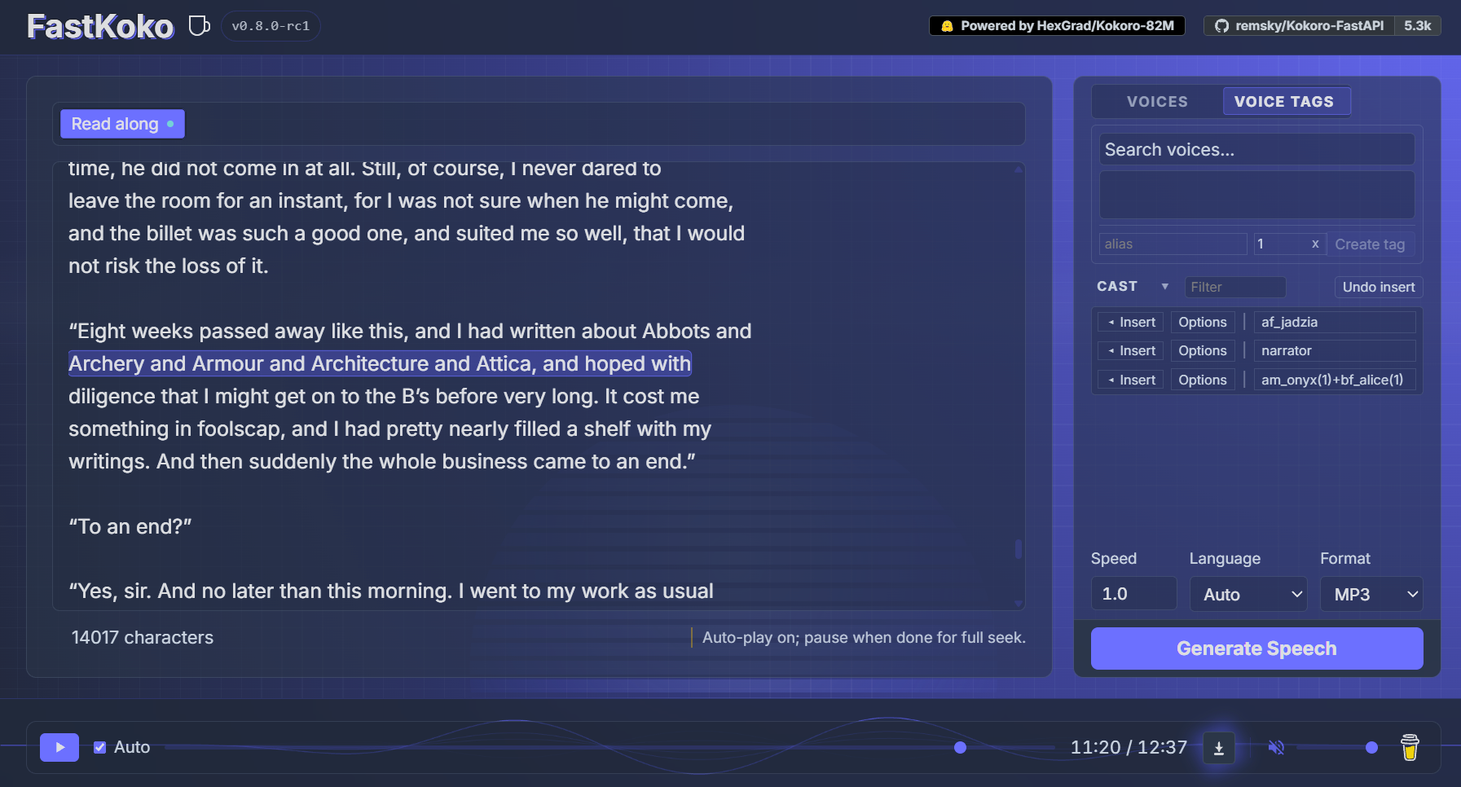
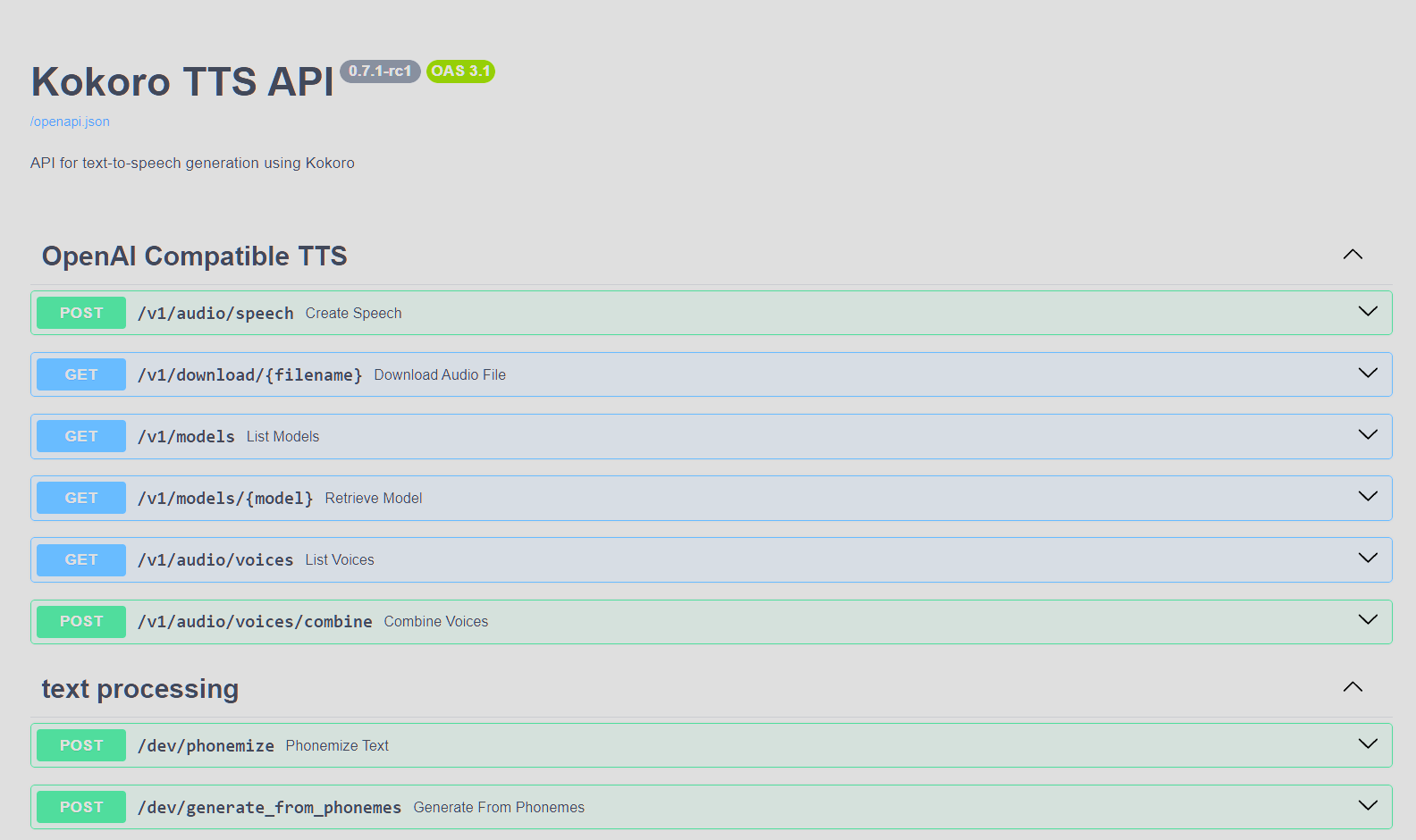
# Using OpenAI's Python library
from openai import OpenAI
client = OpenAI(base_url="http://localhost:8880/v1", api_key="not-needed")
response = client.audio.speech.create(
    model="kokoro",
    voice="af_bella+af_sky", # see /api/src/core/openai_mappings.json to customize
    input="Hello world!",
    response_format="mp3"
)
response.stream_to_file("output.mp3")
import requests
response = requests.get("http://localhost:8880/v1/audio/voices")
voices = [v["id"] for v in response.json()["voices"]]
Generate audio
response = requests.post(
    "http://localhost:8880/v1/audio/speech",
    json={
        "model": "kokoro",
        "input": "Hello world!",
        "voice": "af_bella",
        "response_format": "mp3",  # Supported: mp3, wav, opus, flac, aac, pcm
        "speed": 1.0
    }
)
Save audio
with open("output.mp3", "wb") as f:
    f.write(response.content)
Quick tests (run from another terminal):
python examples/assorted_checks/test_openai/test_openai_tts.py # Test OpenAI Compatibility
python examples/assorted_checks/test_voices/test_all_voices.py # Test all available voices
For Realtime TTS clients (wyoming_openai TTS_REALTIME_MODELS etc). Voice names map the same as on the Speech endpoint.
import asyncio
import base64
import wave
from openai import AsyncOpenAI
async def main():
    client = AsyncOpenAI(api_key="x", base_url="http://localhost:8880/v1")
    audio = bytearray()
    async with client.realtime.connect(model="kokoro") as conn:
        await conn.session.update(session={"type": "realtime", "audio": {"output": {"voice": "af_heart"}}})
        await conn.response.create(response={"conversation": "none", "input": [
            {"type": "message", "role": "user", "content": [{"type": "input_text", "text": "Hello there."}]}
        ]})
        async for event in conn:
            if event.type == "response.output_audio.delta":
                audio += base64.b64decode(event.delta)
            elif event.type == "response.done":
                break
with wave.open("output.wav", "wb") as f:
        f.setnchannels(1)
        f.setsampwidth(2)
        f.setframerate(24000)
        f.writeframes(audio)
asyncio.run(main())
instructions are ignoredsession.update or response.create:voice_aliaseslang_codevolume_multipliernormalization_optionsresponse.cancel stops a response. Audio input and conversation events get an error backwss://, and requires you pass websocket_base_url="ws://localhost:8880/v1"ElevenLabs (multi-stream-input) and Cartesia (/tts/websocket) compatible websockets, so voice agent frameworks can use their existing plugins. Voice ids are Kokoro voice names, API keys are ignored unless API_KEYS is set.
# LiveKit Agents
from livekit.plugins import cartesia, elevenlabs
tts = elevenlabs.TTS(base_url="http://localhost:8880/v1", api_key="x", voice_id="af_heart")
tts = cartesia.TTS(base_url="http://localhost:8880", api_key="x", voice="am_michael")
Pipecat
from pipecat.services.cartesia.tts import CartesiaTTSService
from pipecat.services.elevenlabs.tts import ElevenLabsTTSService
tts = ElevenLabsTTSService(url="ws://localhost:8880", api_key="x", voice_id="af_heart")
tts = CartesiaTTSService(url="ws://localhost:8880/tts/websocket", api_key="x", voice_id="am_michael")
cancel stops generation for that context. ElevenLabs close_context finishes what was already sentvoice_aliaseslang_codevolume_multipliernormalization_optionsENABLE_WEBSOCKET_TTS=false turns these and the Realtime route off# OpenAI-compatible streaming
from openai import OpenAI
client = OpenAI(
base_url="http://localhost:8880/v1", api_key="not-needed")
Stream to file
with client.audio.speech.with_streaming_response.create(
model="kokoro",
voice="af_bella",
input="Hello world!"
) as response:
response.stream_to_file("output.mp3")
Stream to speakers (requires PyAudio)
import pyaudio
player = pyaudio.PyAudio().open(
format=pyaudio.paInt16,
channels=1,
rate=24000,
output=True
)
with client.audio.speech.with_streaming_response.create(
model="kokoro",
voice="af_bella",
response_format="pcm",
input="Hello world!"
) as response:
for chunk in response.iter_bytes(chunk_size=1024):
player.write(chunk)
Or via requests:
import requests
response = requests.post(
    "http://localhost:8880/v1/audio/speech",
    json={
        "input": "Hello world!",
        "voice": "af_bella",
        "response_format": "pcm"
    },
    stream=True
)
for chunk in response.iter_content(chunk_size=1024):
    if chunk:
        # Process streaming chunks
        pass
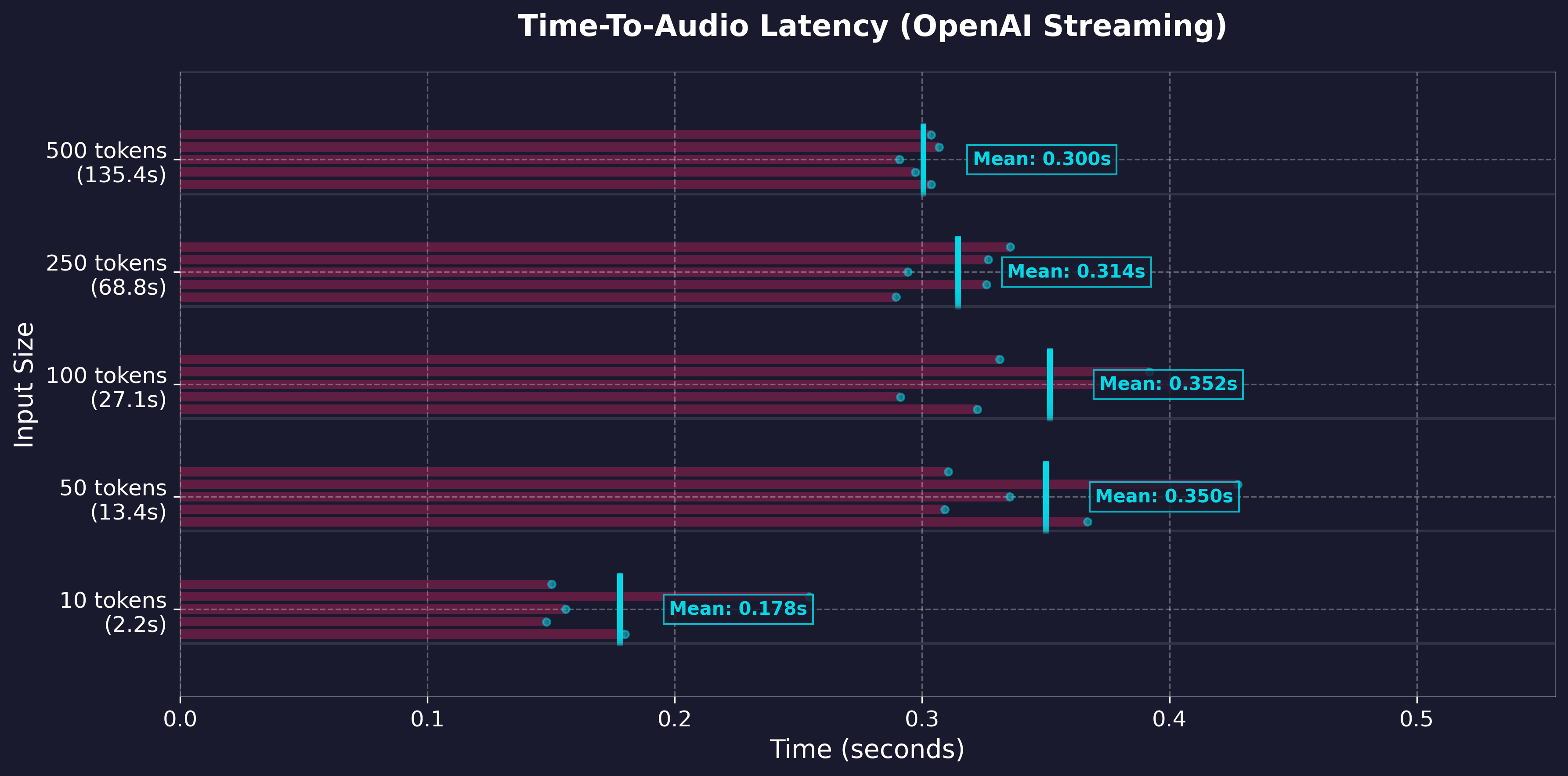
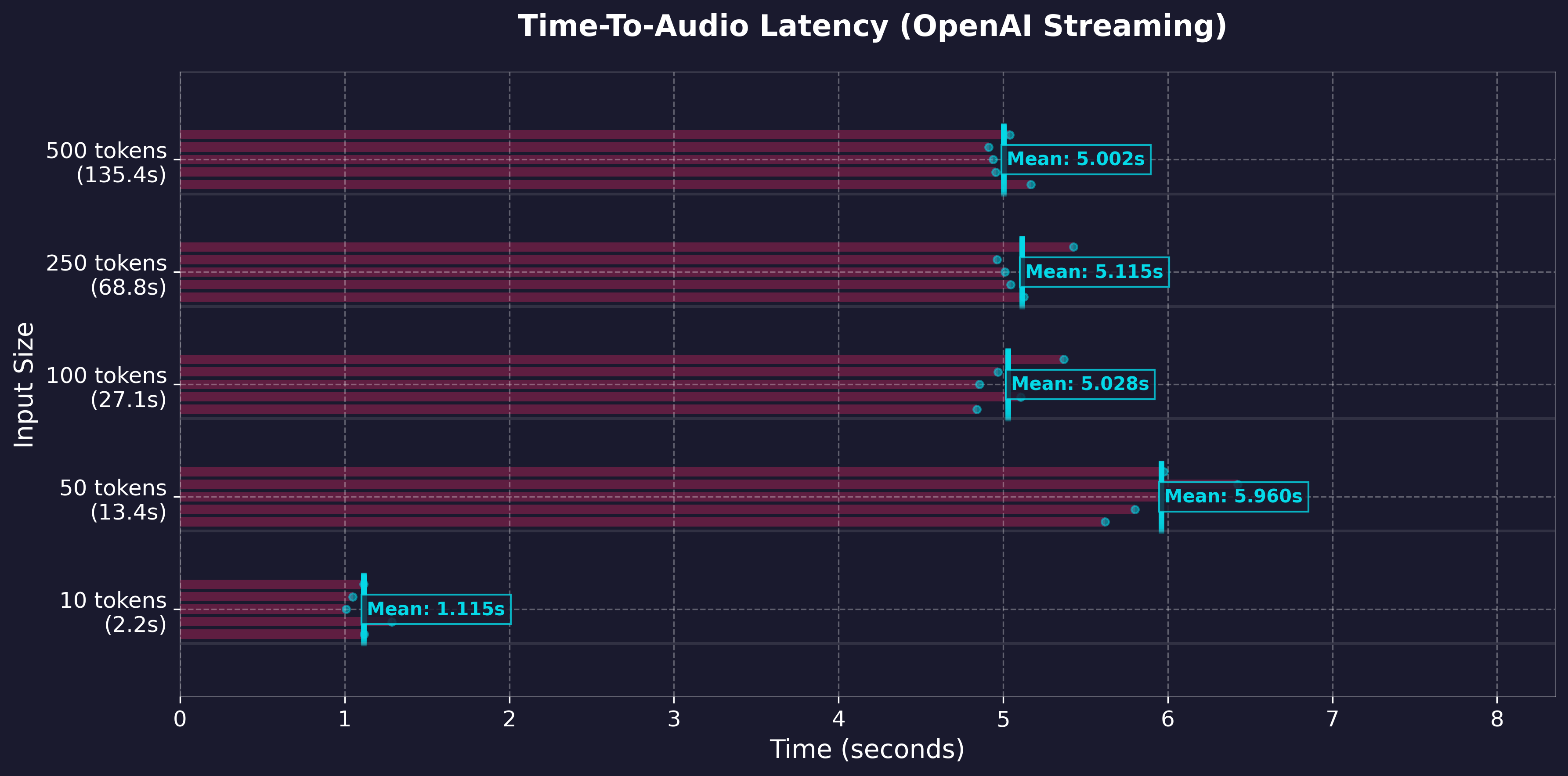
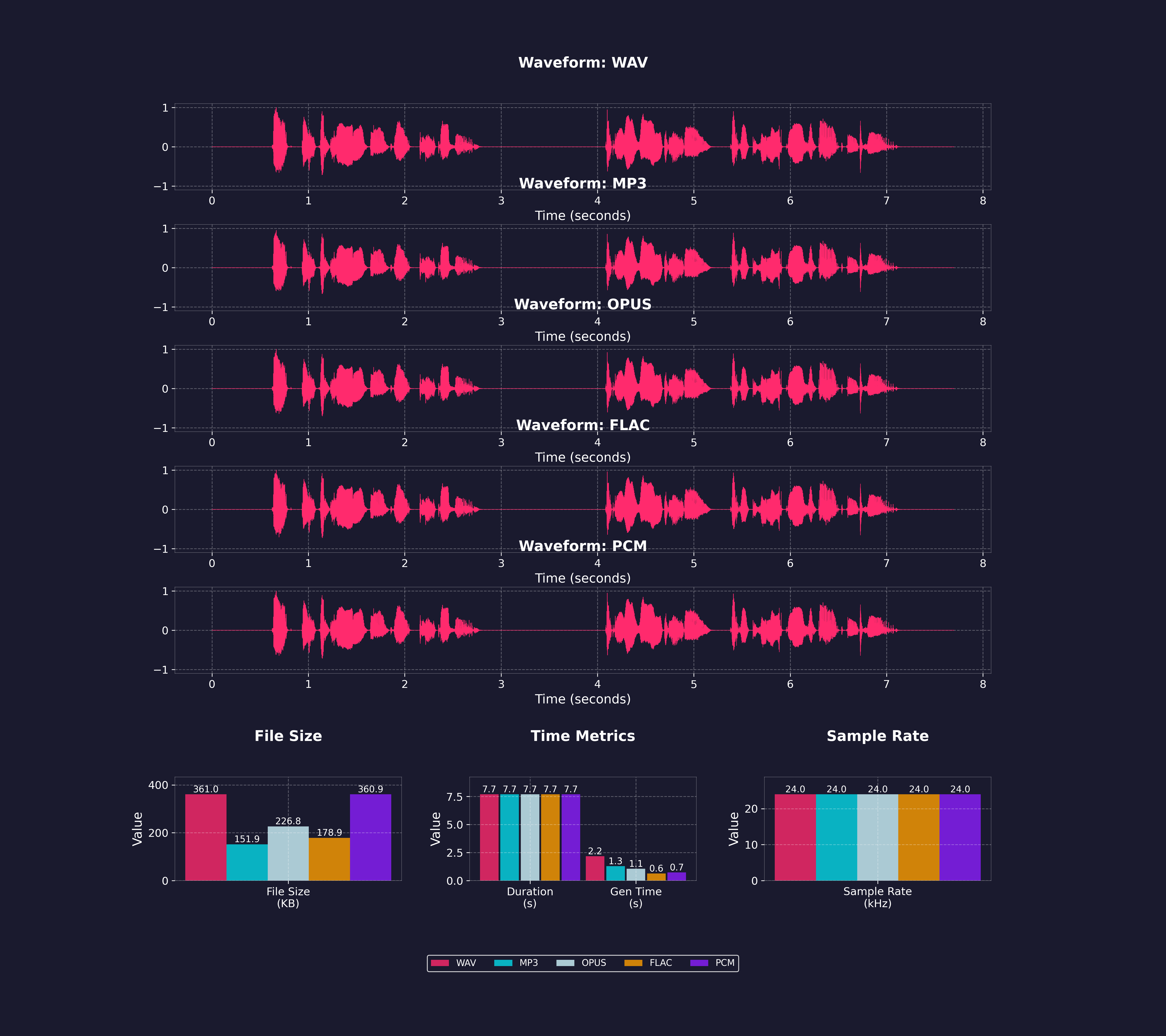
Key Streaming Metrics:
import requests
response = requests.get("http://localhost:8880/v1/audio/voices")
voices = [v["id"] for v in response.json()["voices"]]
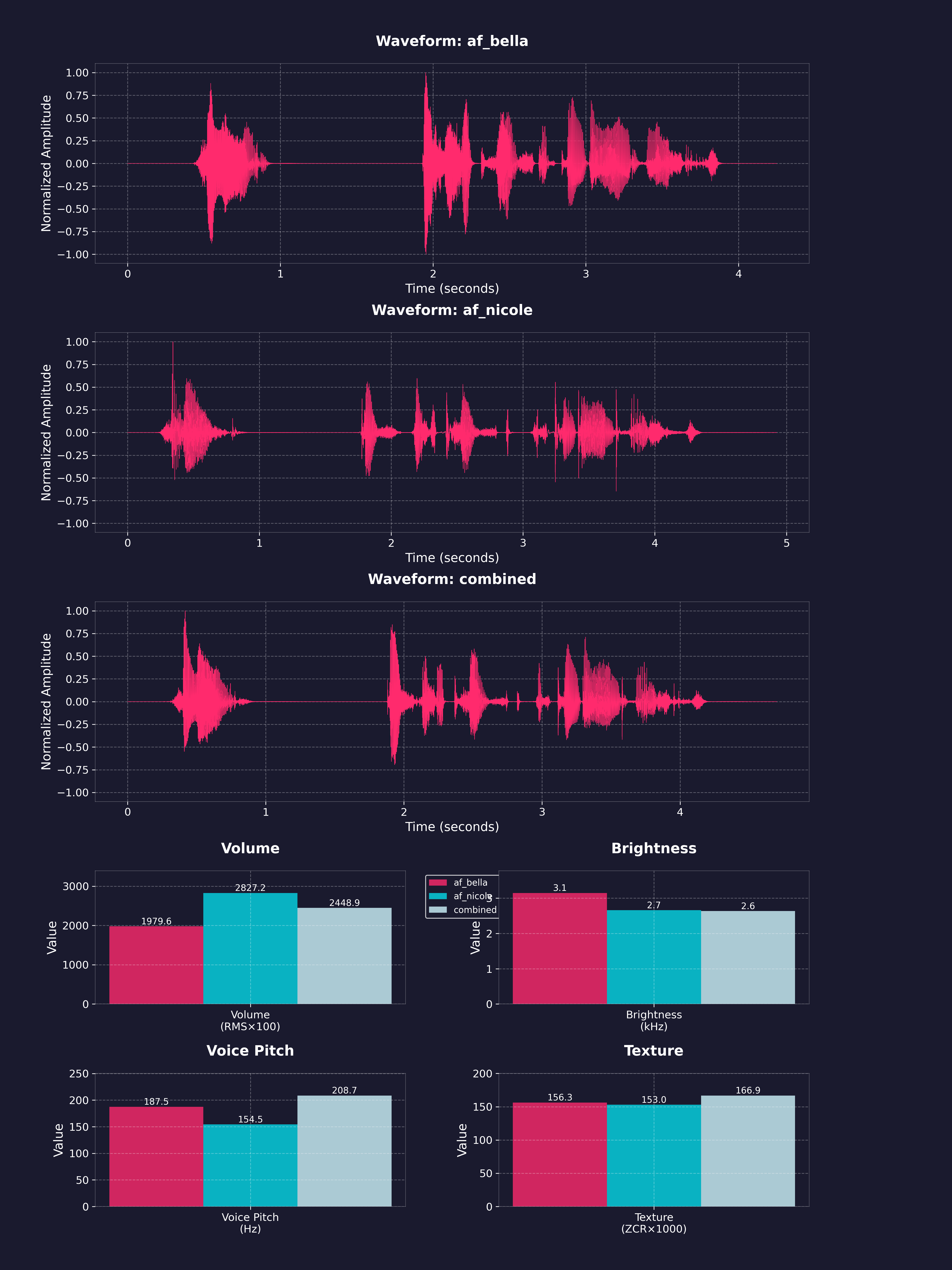
Weighted voice combination (67%/33% mix)
response = requests.post(
    "http://localhost:8880/v1/audio/speech",
    json={
        "input": "Hello world!",
        "voice": "af_bella(2)+af_sky(1)",  # 2:1 ratio = 67%/33%
        "response_format": "mp3"
    }
)
Download combined voice as .pt file
response = requests.post(
    "http://localhost:8880/v1/audio/voices/combine",
    json="af_bella(2)+af_sky(1)"  # 2:1 ratio = 67%/33%
)
Save the .pt file
with open("combined_voice.pt", "wb") as f:
    f.write(response.content)
Use the downloaded voice file
response = requests.post(
    "http://localhost:8880/v1/audio/speech",
    json={
        "input": "Hello world!",
        "voice": "combined_voice",  # Use the saved voice file
        "response_format": "mp3"
    }
)
Weighted mixes can get long fast. voice_aliases maps a short name per request, for both the voice field and [voice:...] tags:
{"voice_aliases": {...}}, which can be sent as-is in API calls.from openai import OpenAI
client = OpenAI(base_url="http://localhost:8880/v1", api_key="not-needed")
client.audio.speech.create(
model="kokoro",
voice="narrator",
input="[voice:narrator] Once upon a time. [voice:villain] Never!",
extra_body={
"allow_voice_tags": True,
"voice_aliases": {"narrator": "af_bella(2)+af_sky", "villain": "am_michael"},
},
)
POST /dev/tune takes a 3 to 30 s clip of one English speaker and returns speech in a voice tuned toward it, via inno-kokoro. It is a tuner, not a cloner. Expect a similar voice, not a match. Only tune voices you have permission to use.
Off by default. ENABLE_INNO_TUNER=true enables the route and a Tune tab in the web player.
import json
import requests
url = "http://localhost:8880/dev/tune"
Speak text in the tuned voice
with open("ref.wav", "rb") as ref:
    response = requests.post(
        url,
        files={"audio": ref},
        data={"request": json.dumps({"input": "Hello there."})},
    )
with open("out.mp3", "wb") as f:
    f.write(response.content)
Download the tuned voice pack
with open("ref.wav", "rb") as ref:
    response = requests.post(url, files={"audio": ref}, data={"return_voice_pack": "true"})
with open("ref.pt", "wb") as f:
    f.write(response.content)
Save it on the server as am_ref_tuned
with open("ref.wav", "rb") as ref:
    response = requests.post(url, files={"audio": ref}, data={"save_voice": "am_ref"})
print(response.json())  # {"voice": "am_ref_tuned"}
request is the /v1/audio/speech body without voicesave_voice keeps the pack in VOICES_DIR as _tuned, usable like any other voice. Off unless ALLOW_LOCAL_VOICE_SAVING=true. Without it, the pack is deleted after the responseam_, bf_, ax_, etc.). Bundled tuned voices end in _innoprosody_head (default on), fmax pitch ceiling in Hz (default auto)[voice:...] tags switch speakers inline, anywhere input is accepted/v1/audio/speech needs allow_voice_tags: true per request; /dev/dialogue allows them by defaultENABLE_VOICE_TAGS=false opts out server-wide: the parameter is refused and /dev/dialogue 403scurl -X POST http://localhost:8880/v1/audio/speech \
-H "Content-Type: application/json" \
-d '{
"model": "kokoro",
"voice": "af_heart",
"input": "The narrator opens. [voice:af_bella] Did it land? [pause:0.3s] [voice:am_michael] It did.",
"allow_voice_tags": true,
"response_format": "mp3"
}' --output dialogue.mp3
With the official OpenAI client, pass the param in extra_body:
client.audio.speech.create(
    model="kokoro",
    voice="af_jadzia",
    input="The narrator opens. [voice:af_bella] Did it land?",
    extra_body={"allow_voice_tags": True},
)
POST /dev/dialogue takes structured turns instead of tags, with an optional pause_between_turns in seconds.
import requests
response = requests.post(
    "http://localhost:8880/dev/dialogue",
    json={
        "turns": [
            {"voice": "af_bella", "text": "Did the multi speaker support land?"},
            {"voice": "am_michael", "text": "It did. Turns switch voices inline."},
        ],
        "pause_between_turns": 0.4,
        "response_format": "mp3",
    },
)
with open("dialogue.mp3", "wb") as f:
    f.write(response.content)
Notes:
voice/default. lang_code will override every speaker.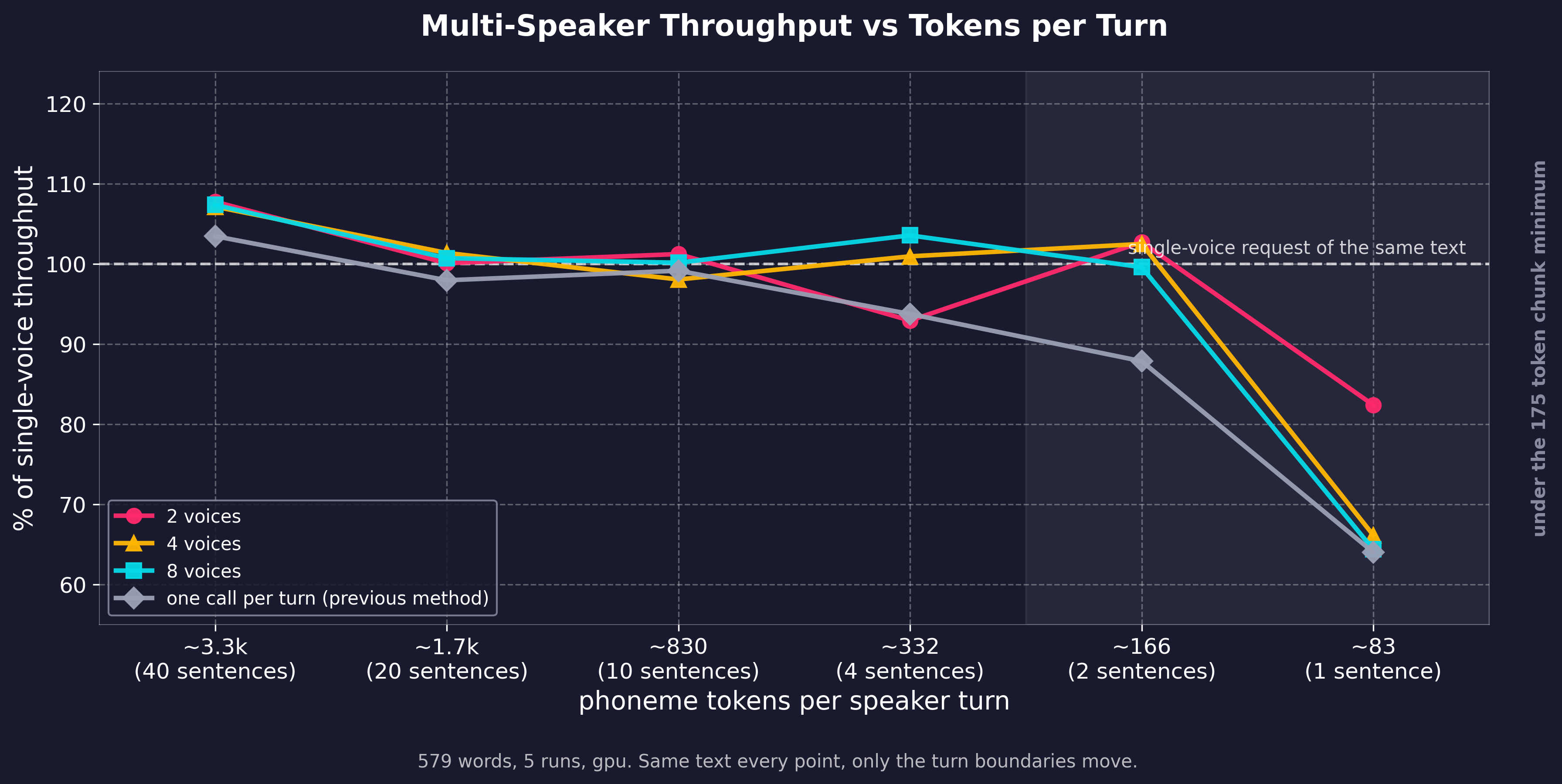
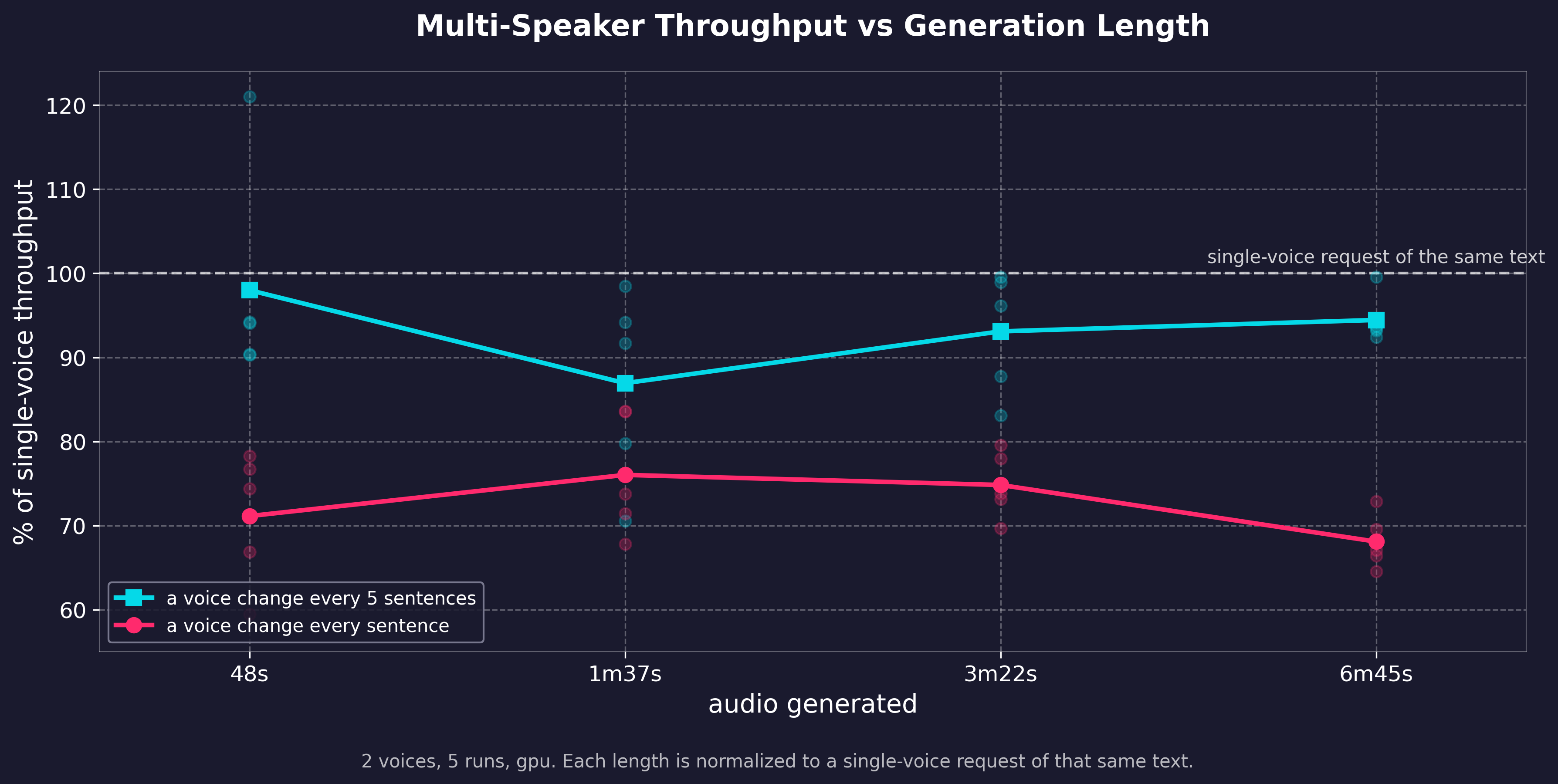
The number of voices has little impact on generation speed. Turns shorter than about 2 sentences do slow it down, from extra chunking. The cost is flat and does not grow with text length. Regenerate with examples/assorted_checks/test_dialogue/.
Four tokens can be embedded in the input text and are parsed server-side (API, WebUI, or any client):
[pause:1.5s] inserts that much silence. Must be exactly this form (colon, trailing s, case-insensitive). [pause=1.5] and [PAUSE 1.0] are not recognized and get read aloud.Worcester speaks the IPA between the slashes instead of the word. English only; use /dev/phonemize to find the IPA.[voice:am_michael] switches speaker for everything that follows.allow_voice_tags: true per request, and ENABLE_VOICE_TAGS server-side (on by default). Otherwise the tag is spoken as written.voice parameter ([voice:af_bella(2)+af_sky]).voice_aliases.[rate:1.5] scales the speaking voice's pace until the next rate tag or voice change; [rate:1.0] reverts. Applies on top of the request speed, clamped to 0.25-4.0. Same gating as voice tags.{"grandpa": {"voice": "am_michael", "rate": 0.8}} applies that rate whenever the alias speaks, as the voice parameter or in tags. Useful for voices that read fast or slow, and for named presets over one voice (narrator_fast, narrator_slow).[rate:] tag scales the speaker's own pace instead of replacing it, so an alias set to 0.8 stays slower under [rate:1.1]. Each [voice:...] tag resets to the new voice's own rate. Use speed to set the pace for the whole request.The city of Worcester is easy. [pause:1s] See?
Send ssml: true with allow_voice_tags: true on /v1/audio/speech or /dev/captioned_speech to translate and speak in one call. Both flags are needed, since the translation emits [voice:] and [rate:] spans that would otherwise be read aloud; ssml without them is a 400.
```json { "model": "kokoro", "input": "Hithere",
→ →
 →
 →
 →
 →
 →
 →