










QL-Win/QuickLook

▲ 105 stars today★ 24,837⑂ 1,318

Bring macOS “Quick Look” feature to Windows

About QL-Win/QuickLook

QL-Win/QuickLook is an open-source project on GitHub, mainly written in C#. Bring macOS “Quick Look” feature to Windows It currently holds 24,837 stars and 1,318 forks with 207 open issues, and was last pushed on 2026-09-14 (repository created 2017-04-12).

Project Overview

Git Homed tracks it on the Today's Trending board, currently at rank #37 with 105 new stars today.


GitHub Repository Details

Repository QL-Win/QuickLook · default branch master · size 347984 KB · watchers 240 · source: GitHub REST API and repository README

README

https://github.com/QL-Win/QuickLook/blob/HEAD/QuickLook Logo

QuickLook

Instant File Previews, Just Press Space

The most powerful Quick Look implementation for Windows

https://github.com/QL-Win/QuickLook/blob/HEAD/Trending https://github.com/QL-Win/QuickLook/blob/HEAD/Featured|HelloGitHub


https://github.com/QL-Win/QuickLook/blob/HEAD/Official Website https://github.com/QL-Win/QuickLook/blob/HEAD/Release https://github.com/QL-Win/QuickLook/blob/HEAD/Downloads https://github.com/QL-Win/QuickLook/blob/HEAD/Stars https://github.com/QL-Win/QuickLook/blob/HEAD/License https://github.com/QL-Win/QuickLook/blob/HEAD/Build Status https://github.com/QL-Win/QuickLook/blob/HEAD/Platform


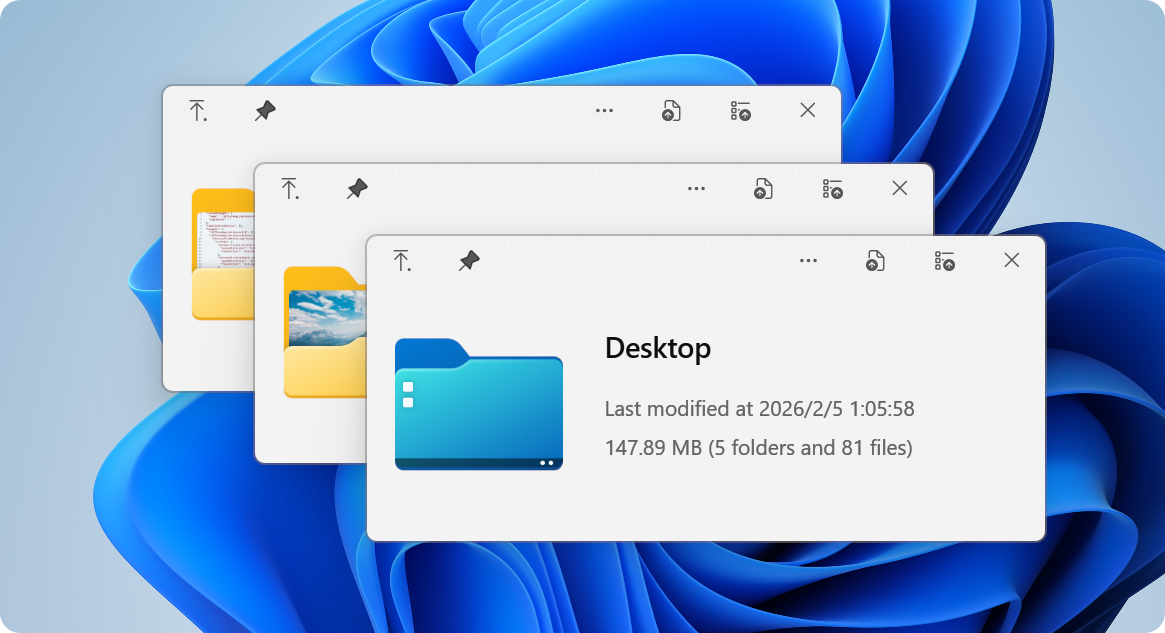
https://github.com/QL-Win/QuickLook/blob/HEAD/QuickLook Preview


The Problem

Superpowers

Get Started

Extend

Community


---

💡 The Problem

Ever wished Windows had macOS's Quick Look?

You know the drill: you want to peek at a file, so you double-click, wait for an app to launch, view the file, close the app... exhausting, right?

macOS users? They just press Space. Instant preview. Any file.

Now Windows has it too. 🎉

QuickLook brings that buttery-smooth, instant-preview experience to Windows. No more waiting. No more opening heavy applications just to peek at a document.

WITHOUT QuickLook:
┌─────────────────┐
│ 1. Double click │
│ 2. Wait...      │
│ 3. App loads    │
│ 4. View file    │
│ 5. Close app    │
└─────────────────┘
   ⏱️ ~10 seconds

WITH QuickLook: ┌─────────────────┐ │ 1. Press SPACE │ │ 2. Done! ✨ │ └─────────────────┘ ⚡ ~0.2 seconds


---

🚀 Superpowers

What Makes QuickLook Extraordinary

⚡️ Lightning Speed

Instant previews with zero lag

Native performance that feels like magic

Hardware-accelerated rendering

🎨 Gorgeous Design

Fluent Design System integration

Beautiful on 4K displays

Touch-optimized interface

🌈 100+ Formats

Images, videos, documents, code

3D models, archives, fonts

Extensible with plugins


📸 Visual Files

  • 🖼️ Images (JPEG, PNG, GIF, WebP, RAW)
  • 🎬 Videos (MP4, AVI, MKV, MOV)
  • 🎨 Photoshop (PSD), Illustrator (AI)
  • 📐 3D Models (OBJ, STL, FBX)
  • 🎭 Animated GIFs & APNGs

📄 Documents

  • 📝 PDF, Word, Excel, PowerPoint
  • 📋 Text files with syntax highlighting
  • 📊 Markdown with live rendering
  • 📜 E-books (EPUB, MOBI)
  • 📑 Comics (CBZ, CBR)

💻 Developer Files

  • 🐍 Python, JavaScript, C++, Rust
  • 🌐 HTML, CSS, JSON, XML
  • ⚙️ Config files (YAML, TOML, INI)
  • 📦 Archives (ZIP, RAR, 7Z, TAR)
  • 🔧 Binary files with hex view

🎵 Media

  • 🎵 Audio (MP3, FLAC, WAV, AAC)
  • 🎼 Sheet music
  • 🎨 Fonts (TTF, OTF, WOFF)
  • 🖌️ Vector graphics (SVG, EPS)
  • 📹 Subtitles (SRT, ASS)


🎯 Works Everywhere

File Explorer

Native integration

Open/Save Dialogs

System-wide support

3rd Party Managers

Total Commander, xplorer²

Cloud Storage

OneDrive, Dropbox ready


---

📦 Get Started

Choose Your Adventure


Microsoft Store

Recommended for most users

✅ Automatic updates ✅ Sandboxed security ✅ One-click install


https://github.com/QL-Win/QuickLook/blob/HEAD/Microsoft Store

⚠️ Limited Open/Save dialog support

Installer

Full-featured experience

✅ Complete functionality ✅ Open/Save dialog support ✅ Portable option available


https://github.com/QL-Win/QuickLook/blob/HEAD/Latest Release

💎 Get the full power

Scoop

For command-line lovers

✅ Easy updates ✅ Reproducible installs ✅ Version management


scoop bucket add extras
scoop install quicklook

🤓 Power user choice

Nightly

Live on the edge

✅ Latest features ✅ Bug fixes first ⚠️ May be unstable


https://github.com/QL-Win/QuickLook/blob/HEAD/Nightly Builds

🌙 Experimental builds


🤔 Not sure which version to choose?


| Feature | Store | Installer | Scoop | Nightly | |---------|-------|-----------|-------|---------| | Auto-updates | ✅ | ⚠️ | ✅ | ⚠️ | | Open/Save dialogs | ❌ | ✅ | ✅ | ✅ | | Portable mode | ❌ | ✅ | ❌ | ✅ | | Stability | ✅✅✅ | ✅✅✅ | ✅✅✅ | ✅✅ |

📖 Read the full comparison


⚡ Quick Start in 10 Seconds

Step 1️⃣  Install QuickLook
         ↓
Step 2️⃣  It runs automatically
         ↓
Step 3️⃣  Select any file
         ↓
Step 4️⃣  Press SPACE
         ↓
Step 5️⃣  🎉 Magic happens!

💡 Pro Tips:

  • QuickLook lives in your system tray
  • Works with any file in File Explorer
  • Use arrow keys to preview multiple files
  • Press Esc or Space again to close
  • Drag files directly from the preview!


---

⌨️ Master the Shortcuts

Your New Superpowers


🎮 Basic Controls

| Key | Action | |-----|--------| | Space | Toggle preview | | Esc Space | Close window | | Enter | Open file | | | Next/Previous |

🔍 Navigation

| Key | Action | |-----|--------| | | Navigate files | | Mouse Click | Select file | | Page Up Down | Scroll content | | Home End | Jump to start/end |

🎨 Advanced

| Key | Action | |-----|--------| | Wheel | Zoom (images) | | Ctrl+Wheel | Zoom (PDFs) | | L-Click Drag | Rotate 3D | | M-Click Drag | Pan 3D |


💡 Pro Tip: You can navigate files using arrow keys even when the preview window isn't focused!


---

🧩 Extend

Supercharge QuickLook with Plugins

Transform QuickLook into a universal file viewer


OfficeViewer

Preview Word, Excel & PowerPoint files

No Microsoft Office required!


✅ Native Office formats
✅ Standalone viewer
✅ Fast rendering

https://github.com/QL-Win/QuickLook/blob/HEAD/Download

PdfViewer-Native

Enhanced PDF viewing with WebView2

Modern, fast, feature-rich


✅ Smooth scrolling
✅ Search & annotations
✅ Hardware acceleration

https://github.com/QL-Win/QuickLook/blob/HEAD/Download

PostScriptViewer

Preview .ps and .eps files

Perfect for designers


✅ Vector rendering
✅ High quality output
✅ Professional formats

https://github.com/QL-Win/QuickLook/blob/HEAD/Download

CADImport

View CAD files natively

.dwg, .dxf, .plt, .cgm


✅ Engineering drawings
✅ Architecture files
✅ Technical diagrams

https://github.com/QL-Win/QuickLook/blob/HEAD/Download


📦 How to Install or Upgrade Plugins

1️⃣ Download

Get the .qlplugin file

2️⃣ Install

Ensure QuickLook is currently running, select the file and press Spacebar.

3️⃣ Restart

Click on the Install button, then restart QuickLook.

📦 How to Remove Plugins

1️⃣ Quit

Quit QuickLook.

2️⃣ Navigate

Navigate to the Data location.

3️⃣ Remove

You should find several folders. Remove the one you do not want to use.


https://github.com/QL-Win/QuickLook/blob/HEAD/Browse Plugins https://github.com/QL-Win/QuickLook/blob/HEAD/Installation Guide


---

💖 Community

Join Thousands of Happy Users


QQ Group

Join our Chinese community

371388501


https://github.com/QL-Win/QuickLook/blob/HEAD/QQ Group

Translate

Help QuickLook speak your language

Make it accessible


https://github.com/QL-Win/QuickLook/blob/HEAD/Translations

Star Us

Show your support

It means a lot!


https://github.com/QL-Win/QuickLook/blob/HEAD/Star us


👨‍💻 For Developers

Interested in contributing? Check out our development resources:

https://github.com/QL-Win/QuickLook/blob/HEAD/Wiki https://github.com/QL-Win/QuickLook/blob/HEAD/Code Style https://github.com/QL-Win/QuickLook/blob/HEAD/Issues


---

🙏 Credits

Built with Love by Amazing People


Design Team

@OiCkilL @QubitsDev @Donno @Shomnipotence

Fluent UI & Icons

Contributors

Our Amazing Team

Code, translations & ideas

Open Source

Libraries We Use

Standing on giants

You!

Every User Matters

Thank you for using QuickLook


---

📜 License


https://github.com/QL-Win/QuickLook/blob/HEAD/GPL v3


QuickLook is free and open source under GPL-3.0

Free software, free forever. No ads, no tracking, no premium tiers.


Need commercial licensing? Contact us for sublicensing options.


---


⭐ Like QuickLook? Star the repo!

Your support keeps this project alive and improving


https://github.com/QL-Win/QuickLook/blob/HEAD/Homepage https://github.com/QL-Win/QuickLook/blob/HEAD/Docs https://github.com/QL-Win/QuickLook/blob/HEAD/Help https://github.com/QL-Win/QuickLook/blob/HEAD/Download


Note: The official website content may be inaccurate or out of date. To help maintain the site, please submit a PR to QuickLook Website Repository


Made with ❤️ by the QuickLook community


GitHub Stars & Activity

24,837Stars
1,318Forks
207Open issues
C#Language

GitHub Popularity

GitHub stars24,837
Forks1,318
Open issues207
Primary languageC#
LicenseGPL-3.0
Stars gained today105
Created2017-04-12
Last pushed2026-09-14

Trending History

Daily boardrank #37 · ▲ 105 stars

Related GitHub Projects

1

2dust / v2rayN

C#★ 116,570⑂ 15,954▲ 86 stars
2

k1tbyte / Wand-Enhancer

C#★ 28,309⑂ 72,323▲ 279 stars
3

babalae / better-genshin-impact

C#★ 15,597⑂ 1,144▲ 24 stars
4

builtbybel / FluentCleaner

C#★ 6,100⑂ 213▲ 27 stars
5

RankFTW / RHI

C#★ 1,614⑂ 48▲ 45 stars
6

affaan-m / ECC

JavaScript★ 263,382⑂ 39,412▲ 1,012 stars
7

ossu / computer-science

HTML★ 209,209⑂ 25,882▲ 62 stars
8

tensorflow / tensorflow

C++★ 200,208⑂ 76,964▲ 28 stars

More Trending Repositories