1
 →

Repository for the Zero Trust Assessment project
microsoft/zerotrustassessment is an open-source project on GitHub, mainly written in HTML. Repository for the Zero Trust Assessment project It currently holds 498 stars and 207 forks with 29 open issues, and was last pushed on 2026-11-11 (repository created 2023-06-01).
Git Homed tracks it on the Today's Trending board, currently at rank #84 with 28 new stars today.


The Zero Trust Assessment is a PowerShell module for administrators who want to review their Microsoft 365 tenant and Azure security configuration. It runs read-only assessments, generates local reports, and provides recommendations to help prioritize improvements.
[!IMPORTANT]
This is a community project maintained by Microsoft employees, not an official Microsoft product. It is provided as-is and is not supported through any Microsoft support program or service. See SUPPORT.md for community help and issue-reporting guidance.
All seven current pillars run by default: Identity, Devices, Network, Data, Infrastructure, SecOps, and AI. The -Preview switch is reserved for preview-only features and is not required for these pillars.
Coverage depends on service connections, permissions, licenses, and available data. Review skipped checks and errors as well as pass/fail results. The assessment does not apply remediation.
The repository can contain changes not yet available in a published package. See the release history for shipped changes, and the PowerShell guide for the current source's requirements and behavior.
Before you start, review the prerequisites and required permissions and roles. Use PowerShell 7.6 or later for the current source's dependencies; published packages can have different requirements. Windows is needed for full service coverage. A dedicated Windows VM and a fresh PowerShell session help avoid dependency conflicts.
Install the stable package, connect to your tenant, and run the assessment:
Install-PSResource -Name ZeroTrustAssessment -Scope CurrentUser
Connect-ZtAssessment -Tenant contoso.onmicrosoft.com
Invoke-ZtAssessment
Replace contoso.onmicrosoft.com with your tenant's verified domain or GUID. The default output directory is .\ZeroTrustReport; use a new output directory for each fresh run. Protect the reports and exports because they can contain sensitive tenant data.
See the PowerShell guide for app-only certificate authentication, pillar selection and resume behavior, and configuration tuning.
Telemetry is enabled by default, with the tenant ID as its only tenant-specific custom property. Assessment results are not included. Use -DisableTelemetry to opt out; see data handling and telemetry for payload and network-metadata details.
Infrastructure results use Microsoft Defender for Cloud recommendations and include only accessible Azure subscriptions tagged with ZeroTrustAssessment:Infrastructure. Arrange the tags and Azure read access before running; see Infrastructure scope.
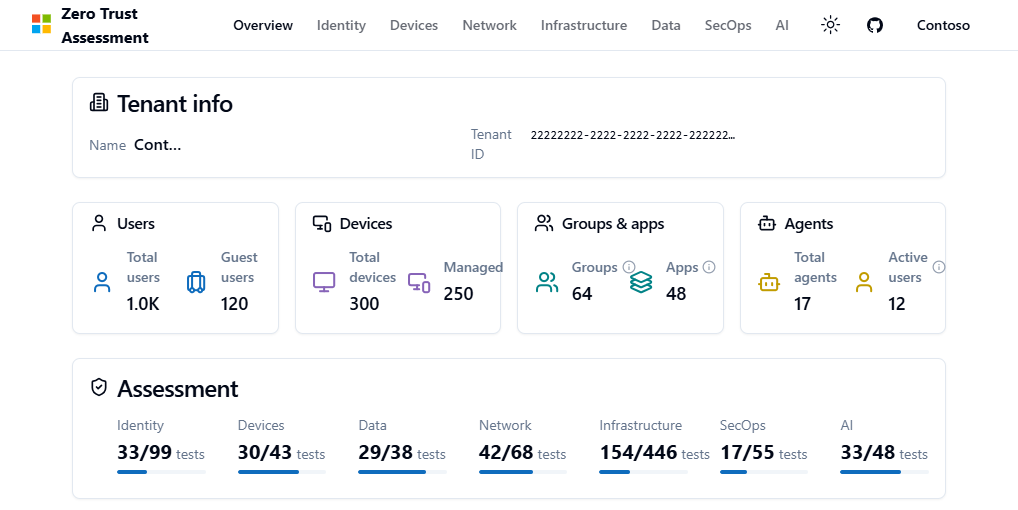
The assessment generates ZeroTrustAssessmentReport.html and retains ZeroTrustAssessmentReport-classic.html alongside it. The overview summarizes the tenant and pillar results; open a pillar to explore findings and guidance.
The screenshot below is from the public demo, which uses synthetic Contoso data.
Reports also include a zt-export\ZeroTrustWorkshop.json file for the experimental Zero Trust Workshop integration.
This project welcomes contributions and suggestions. Most contributions require you to agree to a Contributor License Agreement (CLA) declaring that you have the right to, and actually do, grant us the rights to use your contribution. For details, visit https://cla.opensource.microsoft.com.
Note: Currently only contributors are allowed to submit a pull request. We welcome everyone else to open an issue.
When you submit a pull request, a CLA bot will automatically determine whether you need to provide a CLA and decorate the PR appropriately (e.g., status check, comment). Simply follow the instructions provided by the bot. You will only need to do this once across all repos using our CLA.
This project has adopted the Microsoft Open Source Code of Conduct. For more information see the Code of Conduct FAQ or contact opencode@microsoft.com with any additional questions or comments.
See CONTRIBUTING.md for more details on how to contribute to this project.
This project may contain trademarks or logos for projects, products, or services. Authorized use of Microsoft trademarks or logos is subject to and must follow Microsoft's Trademark & Brand Guidelines. Use of Microsoft trademarks or logos in modified versions of this project must not cause confusion or imply Microsoft sponsorship. Any use of third-party trademarks or logos are subject to those third-party's policies.
→ →
 →
 →→
 →
 →
 →