1
 →

HTML is the new markdown. Lavish is the new editor for your HTML artifacts.
kunchenguid/lavish-axi is an open-source project on GitHub, mainly written in JavaScript. HTML is the new markdown. Lavish is the new editor for your HTML artifacts. It currently holds 4,532 stars and 418 forks with 70 open issues, and was last pushed on 2026-10-29 (repository created 2026-05-11).
Git Homed tracks it on the Today's Trending board, currently at rank #81 with 50 new stars today.
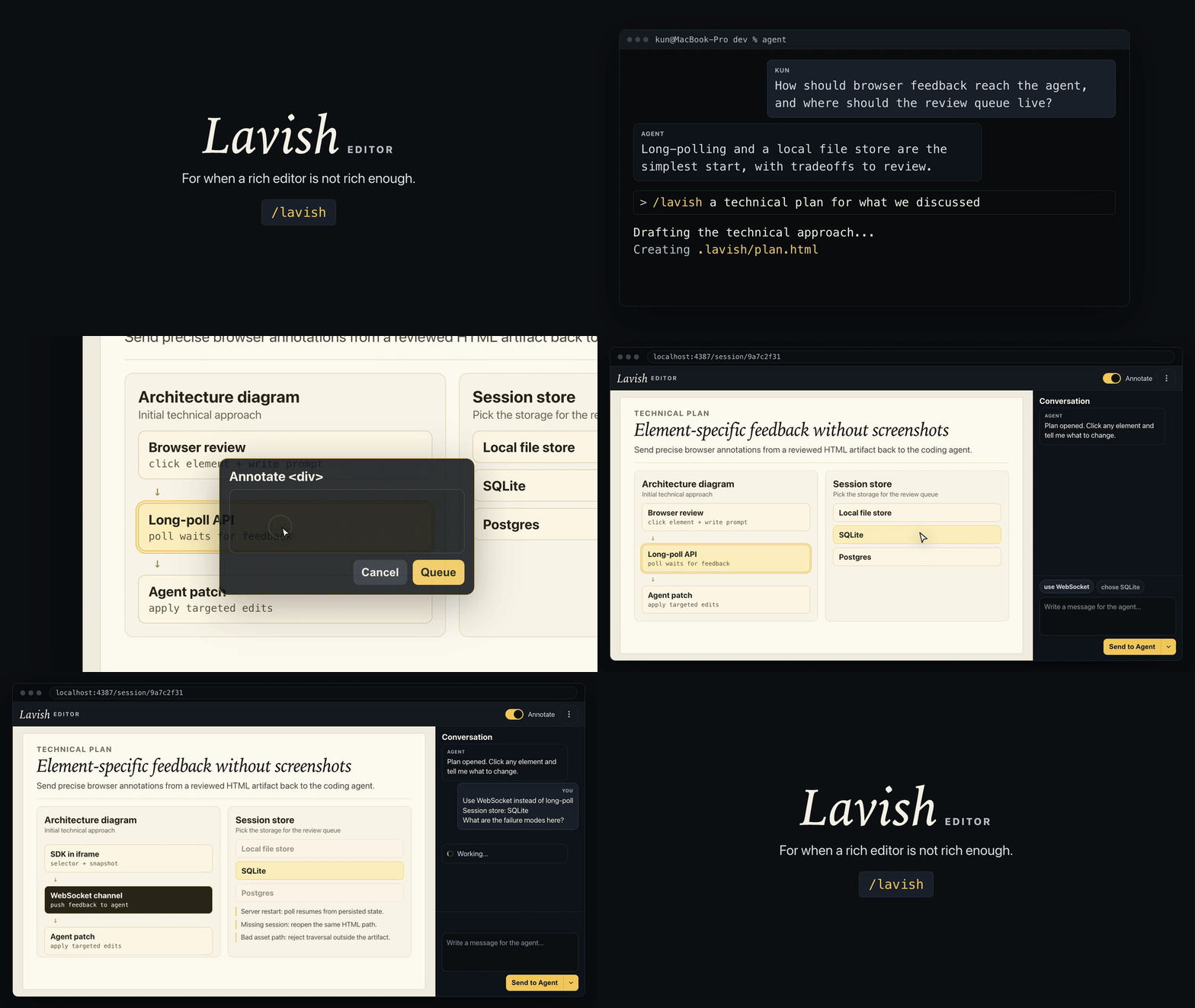
HTML is the new markdown. Lavish is the new editor for your HTML artifacts.
Agents are good at producing rich HTML artifacts, but the human-agent collaboration loop on such artifacts is lacking and falls back into screenshots and long responses for “tell me what to change.” That loses the thing HTML is best at: interactivity.
Lavish Editor opens agent-generated HTML files in a local browser, lets you pinpoint elements and selected text, edit diagrams your agent authored as Mermaid whiteboards, and send feedback to the agent to address.
Install the Lavish skill in the Agent Skills format with npx skills:
npx skills add kunchenguid/lavish-axi --skill lavish
That is the entire setup - no npm install needed.
The skill teaches your agent to run Lavish through npx -y lavish-axi, so the CLI comes along on demand.
It stays a short stub and sends the agent to npx -y lavish-axi --help, reply --help, design, and playbook for current instructions, so an installed copy cannot go stale against a newer CLI.
Its frontmatter also includes Hermes Agent metadata, so Hermes-compatible harnesses can categorize and surface it as a first-class productivity skill.
This installs the public lavish skill.
The repository also contains an internal lavish-design brand skill for maintainers; default npx skills add ... --list and skills.sh discovery hide it unless INSTALL_INTERNAL_SKILLS=1 is set.
Then, in agents that expose skills as slash commands (Claude Code, for example), invoke it directly:
/lavish let's discuss our plan here
Or just ask for anything that is easier to grasp visually - a plan, comparison, diagram, table, code view, or report - and the agent loads the skill on its own when it recognizes the task.
By default the skill lands in the current project's skills directory (.claude/skills/, for example); add -g to install it for all projects (~/.claude/skills/).
The skill is the recommended path, but it is not the only one.
Lavish is an AXI, so any capable agent can run the CLI directly with nothing installed at all. Just tell your agent:
Use npx -y lavish-axi to write a product or technical plan for what we discussed.
Want Lavish's ambient context - including your live open sessions - fed into every agent session instead of loading on demand? Install the CLI globally and opt into the hook:
npm install -g lavish-axi
lavish-axi setup hooks
This installs a SessionStart hook for Claude Code, Codex, OpenCode, and GitHub Copilot CLI that surfaces open sessions, visualization playbooks, and usage guidance at the start of each session.
Unlike the skill, the hook also shows your live open sessions, so a fresh agent session can resume an in-flight review.
Restart your agent session after running this so the new hook takes effect.
Lavish also ships as an Agent Plugin - the vendor-neutral packaging standard for skills and MCP servers - so clients that speak that format can load it directly.
No marketplace is involved. The installed npm package _is_ the plugin: plugin.json sits at the package root next to the skills/ directory, so whatever npm install already put on disk is a complete, conformant plugin. Install the CLI, then register it:
npm install -g lavish-axi
lavish-axi setup plugin
That registers the installed package with every supported client it finds - VS Code, Cursor, and GitHub Copilot CLI - and reports which ones were absent. It is opt-in and idempotent, and it repairs the registered path after a reinstall or relocation. Reload each client afterward.
Each client is registered independently: one that cannot be registered is reported with what to do about it, and never blocks the others or fails the command.
To register by hand instead, point any client at the package directory (npm root -g/lavish-axi):
| Client | Register with |
| ------------------ | ------------------------------------------------------------------------------------------------------------------ |
| VS Code | "chat.pluginLocations": { "": true } in user settings |
| Cursor | link the package dir at ~/.cursor/plugins/local/lavish-axi (setup plugin handles Windows link compatibility) |
| GitHub Copilot CLI | copilot plugin install (or copilot plugin install kunchenguid/lavish-axi straight from the repo) |
Codex and ChatGPT install plugins only from marketplace sources, so Codex users should use the session hook above instead.
Lavish declares no MCP server - the CLI itself is the agent interface - so a plugin install brings the same lavish skill, and the skill and plugin are alternatives rather than a stack.
git clone https://github.com/kunchenguid/lavish-axi.git
cd lavish-axi
pnpm install --frozen-lockfile
pnpm run build
pnpm link
┌───────────────┐
│ Agent writes  │
│ artifact.html │
└───────┬───────┘
        ▼
┌────────────────────────┐
│ lavish-axi <file_path> │
│ opens local browser UI │
└───────┬────────────────┘
        ▼
┌────────────────────────┐
│ Human annotates text   │
│ or elements, sends     │
│ chat, or queues layout │
│ issues from the inbox  │
└───────┬────────────────┘
        ▼
┌────────────────────────┐
│ lavish-axi poll waits  │
│ and returns prompts    │
│ the user queued        │
└────────────────────────┘
lavish-axi or directly in a browser.
Run lavish-axi design for the single source of agent-facing design guidance, including optional CDN snippets and the whiteboard (Mermaid) opt-in snippet.
lavish-axi , export, and share run a render-free check for artifacts missing an explicit page background and return a one-line self_paint_warning.@import, Tailwind runtime script, color-scheme, or html/body/:root background signal suppresses it - and it never blocks the open.
layout-warnings, that reaches the agent through the normal feedback path when they send.
Detection never returns lavish-axi poll and never wakes an agent; only the user queueing a fix does. The one exception is a fatal artifact_failures response, for failures that make the review itself unusable, such as the artifact document or one of its own local assets failing to load.
Open means the latest completed check for its viewport still detects it. Queued for fix means the user asked for a repair - it stays unresolved and counted, and cannot be queued again while that request is outstanding.
Resolved requires a newer successful artifact load plus a complete check at the same viewport that no longer detects it; it then leaves the count but keeps a bounded history.
Still present (recurring) means a queued issue survived a newer revision, so it is selectable again with its earlier attempt retained. Unverified means a reload or check failed or was incomplete, so the prior issue was preserved rather than cleared. Returned means a resolved issue came back on a later revision.
Dismissal applies only to the current artifact revision; a later revision surfaces the issue again if it is still detected. A check at one viewport never clears an issue found at another, and a viewport removed from the configured diagnostic set (LAVISH_AXI_DIAGNOSTIC_VIEWPORTS, default all) is marked obsolete with an explicit reason rather than reading as fixed.
array of { id, label, timestamp, summary } entries, plus data-lavish-revision="" on each block it edited or added. Run lavish-axi design` for the snippet. and first when it loads. A long-lived artifact can keep the tab current afterwards with window.lavish.setDocumentMeta({ title, icon }): a string sets the field (a title that is blank after trimming restores the load-time title), null restores the load-time value, and an omitted field is left alone. The title is trimmed to 120 characters and shown as · Lavish; the icon must be a data:image/svg+xml URL of at most 8192 characters. Anything else is ignored. A value stays until the next call or until the tab itself reloads, so call again after each page update. The call is a no-op when the page is not open in Lavish, so feature-detect with window.lavish?.setDocumentMeta?.(...)`./assets/logo.png will not resolve through Lavish's artifact route.lavish-axi export writes .export.html by inlining local assets only, stripping the annotation SDK, and leaving remote CDN/font references as links that still need network access.lavish-axi share publishes the same local-inlined HTML to ht-ml.app, a third-party hosting service not part of Lavish.
Publishing sends the artifact to ht-ml.app's servers, public by default, or private and password-protected with --private (Lavish generates the password and returns it once, in the command output and in the browser publish dialog) or --password (one you supply, never echoed back). A generated password is a shared secret: give it to whoever should read the page, and expect it to appear in your agent's transcript, because the agent has to relay it. Lavish does not store it.
The response includes a secret update_key shown once. Keep it to republish the same URL later with --site <site_id> --update-key , which replaces the HTML in place and leaves the password alone unless you pass --private (rotate to a new generated one) or --password (set one). Locking a page that was public is not instant - it can keep answering from ht-ml.app's CDN cache for minutes after the password is set - while a page that was already private has no such cached copy.
A page's password cannot be removed: ht-ml.app accepts a request to clear one and silently ignores it, so Lavish offers no way to make a private page public rather than telling you it did something the host did not do. Republish as a new page if you need a public URL.
ht-ml.app has no delete endpoint, so --unpublish --site <site_id> --update-key replaces the page with a short placeholder and locks it behind a discarded random password rather than removing it: the URL still resolves and the host still holds what was published. The content swap is immediate, but the lock is not: a page that was public can keep serving the placeholder to uncredentialed visitors from ht-ml.app's CDN cache for minutes afterwards. The update_key plus --private republishes real content behind a new password you can share.
Bundling never fetches remote URLs, Lavish itself does not set a CSP, local reads stay confined and size-capped, and absolute file:// paths outside safe inlined asset references are redacted before output.
Per-asset and per-bundle inline caps default to 10 MB and 25 MB, overridable with LAVISH_AXI_EXPORT_MAX_ASSET_BYTES and LAVISH_AXI_EXPORT_MAX_BUNDLE_BYTES.
Unresolved local assets or export notices such as author-set CSP meta tags and redacted file URLs are surfaced in command or browser output.
Use --token or LAVISH_AXI_HTML_APP_TOKEN for an optional bearer token when publishing a new page (a republish or --unpublish authorizes with the update_key instead and rejects --token); set LAVISH_AXI_HTML_APP_API_URL to override the ht-ml.app API base and point share at a backend you control (see Self-hosting the share backend for the contract it must implement).
data-lavish-question controls (application-owned form state is left alone). Supported review state and the unsent queue are saved in that tab's sessionStorage and survive a full reload of the review page in the same tab when browser storage is available. They are not shared with another tab or window; closing the owning tab can lose work that has not been sent. While a queued layout-issue batch is outstanding, closely spaced saves coalesce so one batch of fixes costs one refresh. To also reload on sibling asset changes, add data-lavish-live-reload-root to the root element or ``.button, checkbox, combobox, menuitem, menuitemcheckbox, menuitemradio, option, radio, switch, tab, treeitem) are interactive automatically, so they do not need data-lavish-action. A link (data-lavish-annotate="off" on the root ` element so stray clicks do not open annotation cards. Annotation stays on by default (or with "on"); unknown values default to on. The toolbar reflects the page default and can override it; the reviewer's choice persists across artifact reloads within that review page. See lavish-axi playbook input` for author guidance.
For reversible choices, let option clicks update local state, then queue exactly one final answer from a per-question submit or Queue answer button with window.lavish.queuePrompt().
If someone may open a decision artifact as a standalone HTML file, lavish-axi playbook input provides an optional Copy all answers control they can use to paste their form answers back into chat.
Mark only custom (non-native) clickable elements with data-lavish-action so Lavish does not annotate them, and use data-lavish-question or queueKey when pre-send updates for the same question should replace each other.
Everything you send is part of the conversation: a note on an element, a text selection, a table cell, a diagram node, a whiteboard, a layout-issue batch, or a composer message each becomes a bubble on your side of the Conversation panel, with an anchor line naming what it was attached to (the element tag, text selection, table cell, diagram node, whiteboard, or layout issues), a quoted excerpt, and, when available, the selector on hover. A note you have queued but not sent sits at the end of the conversation as a dashed bubble labelled Queued with edit and remove controls. Clicking the bubble or its edit control opens its words for editing in place and scrolls the artifact to the element it points at; clicking that element again in annotate mode opens the same note rather than a fresh card. Saving a note with no words and no images removes it, and Send delivers an open edit as typed. While its batch is in flight it reads Sending and can no longer be edited, and once the server accepts it, it settles in place as a sent bubble in every tab of the session. The panel keeps the newest stored transcript up to 5 MiB; older bubbles drop from view, but an accepted note still settles and is not sent twice. Agent replies render a small Markdown subset - paragraphs, line breaks, headings as bold lead lines, bullet and numbered lists, fenced and inline code, bold, italic, and http(s) links - while tables, images, and raw HTML stay as the text the agent wrote; your own messages keep their line breaks and are never parsed.
On wider screens, the conversation and the queued notes share one scrollable Conversation panel above a sticky composer, so long feedback queues do not push the text box or send controls off screen. The sidebar button in the top bar hides that panel so the artifact takes the full width, and shows it again; while it is hidden the button counts queued notes or marks an agent reply you have not seen, and the choice is remembered in this browser for every review.
The browser chrome keeps editing actions in the overflow menu (copy path, reload artifact, copy DOM snapshot, export standalone HTML, publish link, end session), while the composer exposes Send & End beside Send to Agent to submit queued prompts and user-ended attribution together. Once Send & End starts, Lavish pauses new feedback, waits up to 5 seconds for feedback preparation already underway, keeps any open annotation draft intact until delivery succeeds, then holds that exact terminal batch. A completed r→ →
 →
 →
 →
 →
 →
 →