1
 →
→
A practical Douyin downloader for both single-item and profile batch downloads, with progress display, retries, SQLite deduplication, and browser fallback support. 抖音批量下载工具,去水印,支持视频、图集、合集、音乐(原声)。
jiji262/douyin-downloader is an open-source project on GitHub, mainly written in Python. A practical Douyin downloader for both single-item and profile batch downloads, with progress display, retries, SQLite deduplication It currently holds 11,994 stars and 1,844 forks with 0 open issues, and was last pushed on an unknown date (repository created unknown).
Git Homed tracks it on the Today's Trending board.

A practical Douyin downloader supporting videos, image-notes, collections, music, favorites collections, and profile batch downloads, with progress display, retries, SQLite deduplication, download integrity checks, and browser fallback support.
A desktop GUI built on the same backend, with dedicated workspaces for Douyin, TikTok, and YouTube. Paste a link to start, sync account content, follow every task, and manage downloaded works in a local archive.
Beta: The desktop app is currently in closed beta. To try it, download the build from the Releases page.
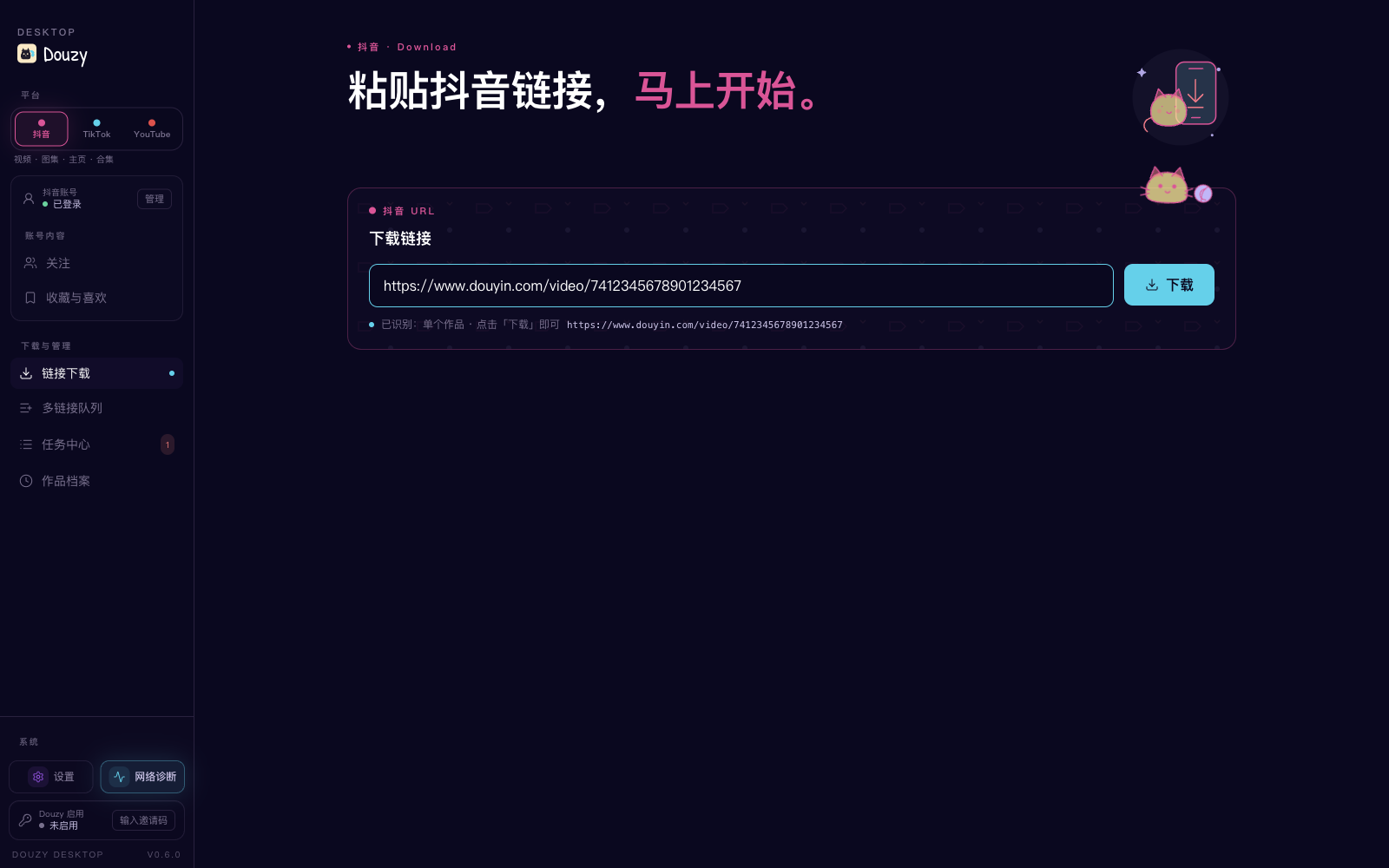
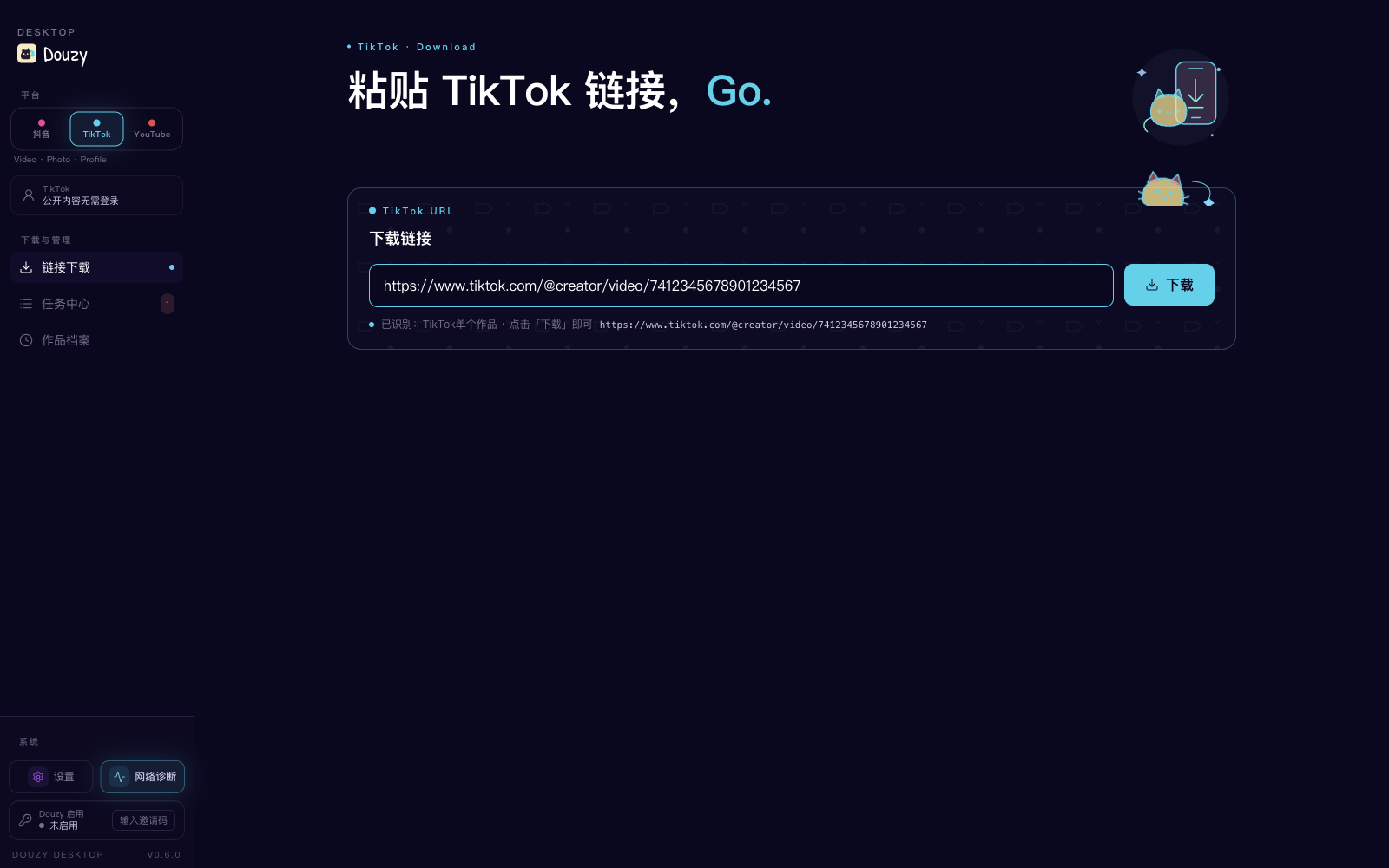
| Douyin link download | TikTok download workspace | YouTube workbench |
|:---:|:---:|:---:|
|  |
|  |
| 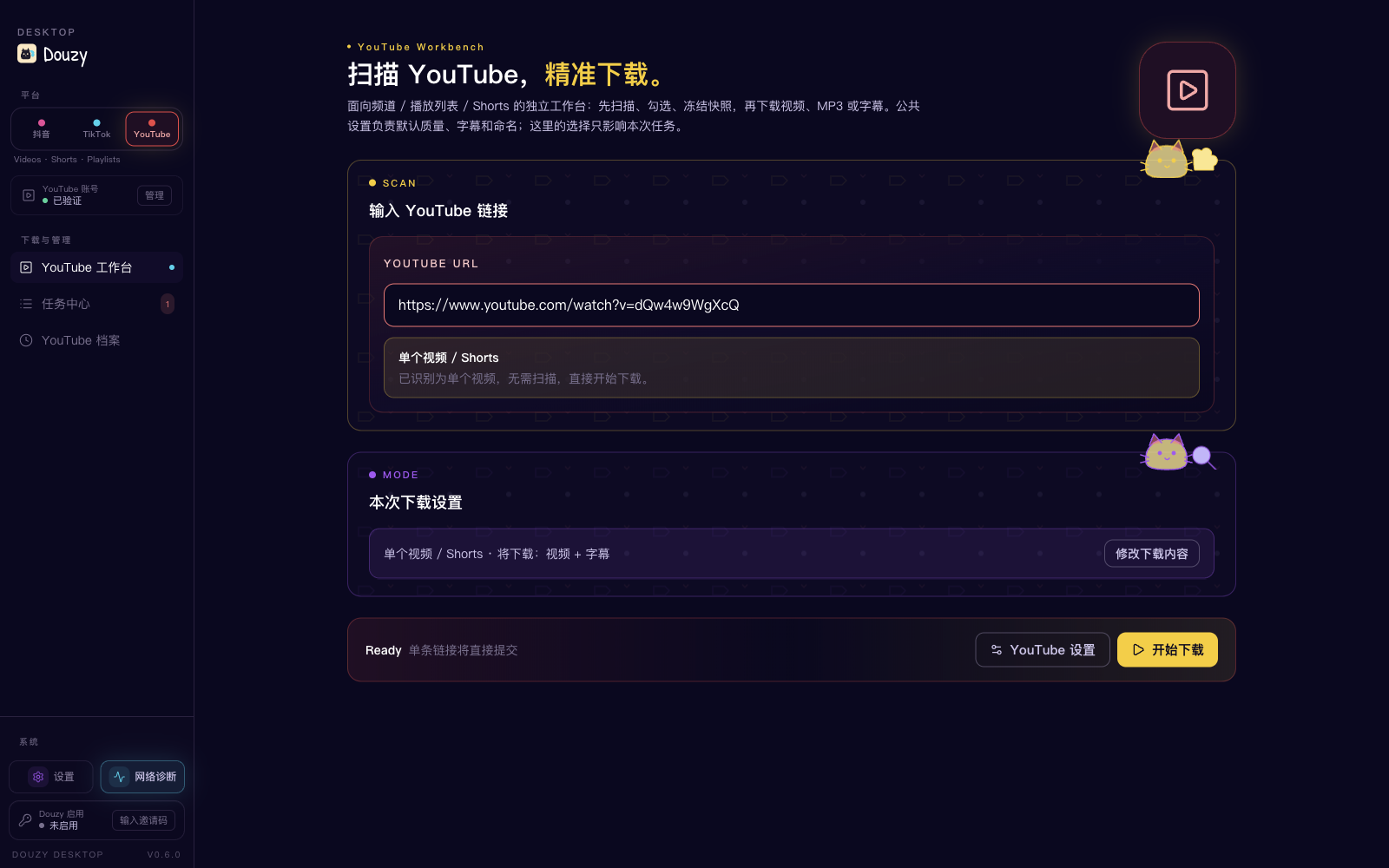 |
| Paste a video, gallery, profile, or collection link and start in one click. | Download public videos, photo posts, and profiles without signing in. | Scan videos, Shorts, channels, and playlists, then configure video, MP3, or subtitle downloads. |
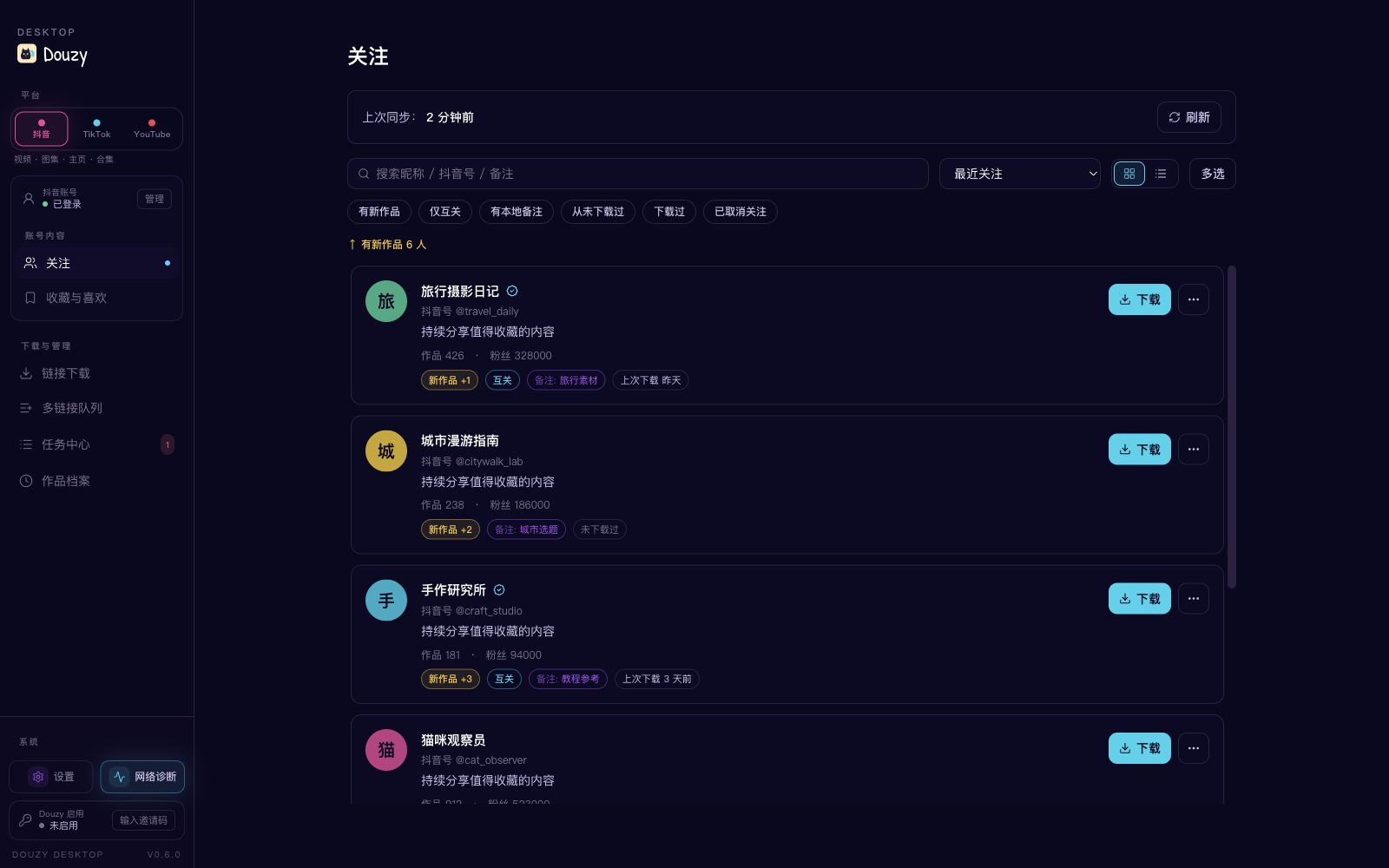
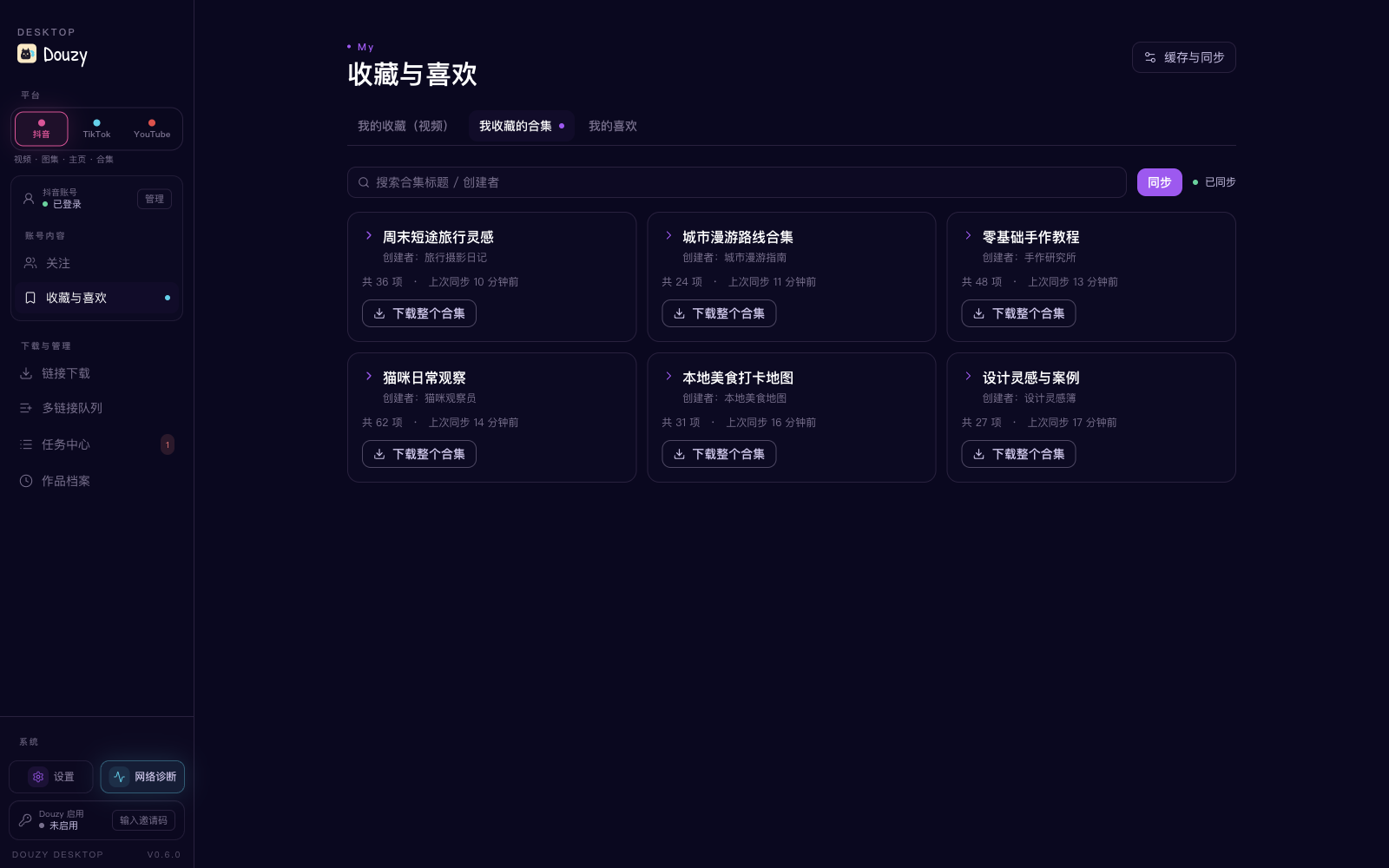
| Following management | Favorites and likes | Task Center |
|
|
| Paste a video, gallery, profile, or collection link and start in one click. | Download public videos, photo posts, and profiles without signing in. | Scan videos, Shorts, channels, and playlists, then configure video, MP3, or subtitle downloads. |
| Following management | Favorites and likes | Task Center |
|  |
|  |
| 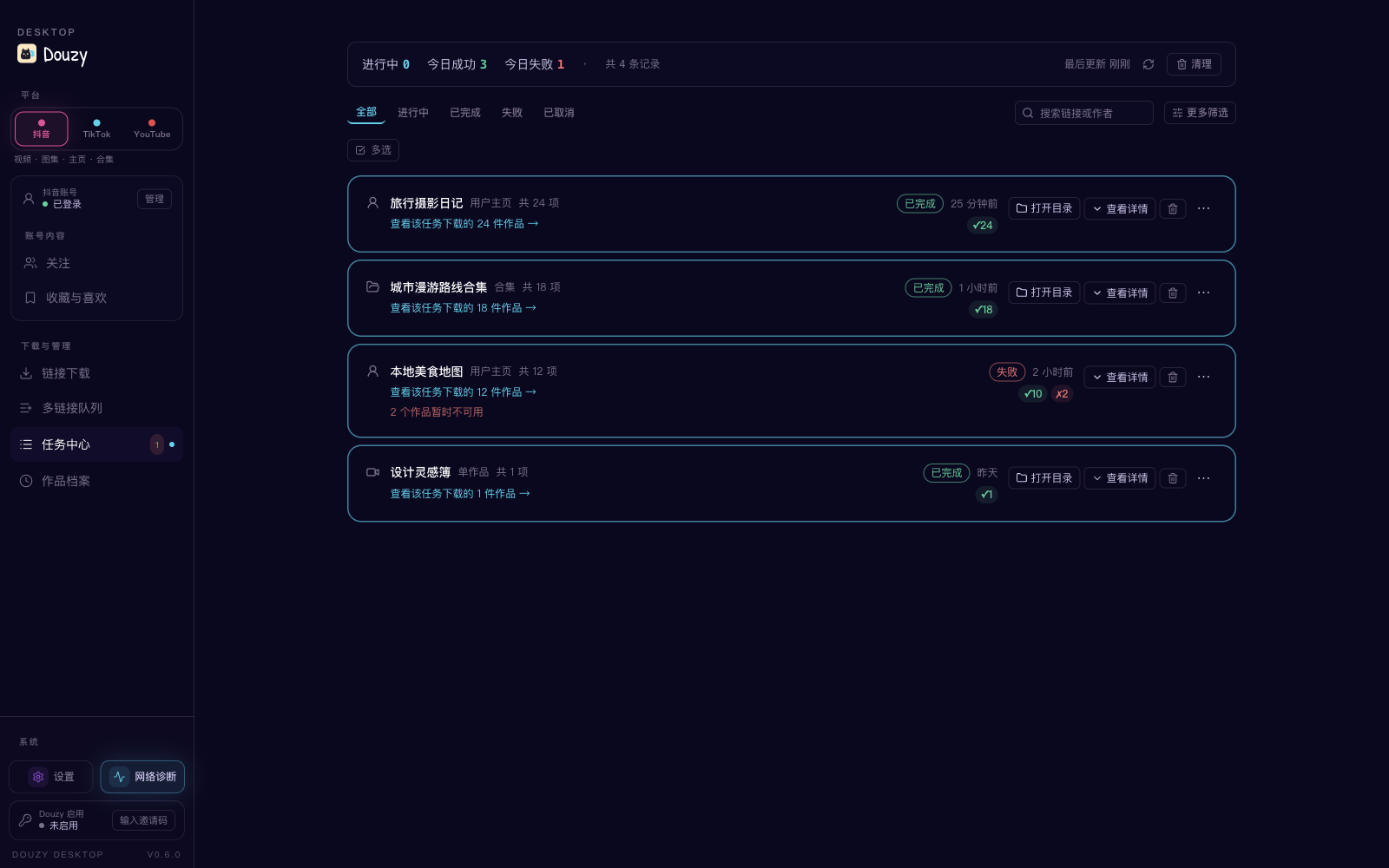 |
| Sync creators, filter new works, add notes, and download directly from the list. | Browse collected videos, series, and liked works from the current Douyin account. | Track job results, retry failures, and open output folders. |
|
| Sync creators, filter new works, add notes, and download directly from the list. | Browse collected videos, series, and liked works from the current Douyin account. | Track job results, retry failures, and open output folders. |
_Screenshots were captured from the current desktop main build. Demonstration data is used for privacy._
⚠️ Douyin's anti-bot gate blocks the CLI from downloading likes / favorites / favorite collections (since 2026-08) and single videos / notes, collections and music (since 2026-09); profile posts can only rely on the browser fallback. See Current Limitations for the cause and what still works; use the Douzy desktop app for these downloads.
| Feature | Description |
|---------|-------------|
| Single video download | /video/{aweme_id} |
| Single image-note download | /note/{note_id} and /gallery/{note_id} |
| Single collection download | /collection/{mix_id} and /mix/{mix_id} |
| Single music download | /music/{music_id} (prefers direct audio, fallback to first related aweme) |
| Short link parsing | https://v.douyin.com/..., v.iesdouyin.com, bare hosts |
| Profile batch download | /user/{sec_uid} + mode: [post, like, mix, music] |
| Logged-in favorites collections | /user/self?showTab=favorite_collection + mode: [collect, collectmix] |
| No-watermark preferred | Automatically selects watermark-free video source |
| Highest-quality selection | Auto-picks highest bitrate from video.bit_rate ladder (video + live-photo) |
| Live stream recording | live.douyin.com/{room_id} → FLV/HLS, preserves partial data on stream end |
| Comments collection | Per-aweme comments (+ optional replies) saved as *_comments.json |
| Hot search + keyword search | --hot-board [N] / --search "keyword" dumps to JSONL |
| REST API server mode | --serve --serve-port 8000 (optional fastapi + uvicorn) |
| Notification push | Bark / Telegram / Webhook on download completion |
| Extra assets | Cover, music, avatar, JSON metadata |
| Video transcription | Optional, using OpenAI Transcriptions API |
| Concurrent downloads | Configurable concurrency, default 5 |
| Retry with backoff | Exponential backoff (1s, 2s, 5s) |
| Rate limiting | Default 2 req/s |
| SQLite history | Records download metadata; does not decide incremental skips |
| Incremental downloads | Disk-based skip/redownload via increase.post/like/mix/music |
| Time filters | start_time / end_time |
| Browser fallback | Launches browser when pagination is blocked, manual CAPTCHA supported |
| Download integrity check | Content-Length validation, auto-cleanup of incomplete files |
| Progress display | Rich progress bars, supports progress.quiet_logs quiet mode |
| Docker deployment | Dockerfile included |
| CI/CD | GitHub Actions for testing and linting |
ArgusSecurityPlugin answers every non-browser request to these endpoints withBlocked by ArgusSecurityPlugin Uifid Not Found, with or without cookies and no matter how often you retry:
aweme/favorite, collects/*, aweme/listcollection, mix/listcollection (likes / favorites / favorite collections)mix/aweme (collection items)aweme/detail (single video / note), aweme/post (profile posts), mix/detail, mix/list,music/detail, music/aweme, music/list
The required x-secsdk-web-signature can only be produced by the SDK inside a real Douyin web page, which the CLI's
direct API requests cannot carry, so single videos / notes, collections, music and likes / favorites cannot be
downloaded in the CLI. Profile-post (post) API paging is rejected as well; with playwright installed and
browser_fallback left on (headed by default), the browser fallback reads the page's own post-list requests and may
still work, but it has not been tested against this gate. The Douzy desktop app sends these requests through its
built-in login window and is not affected.
Endpoints still reachable directly as of 2026-09-14: user profile, following list, comments, live rooms (webcast),
hot board and search.
post; like/mix/music currently relies on API paginationnumber.allmix / increase.allmix are retained as compatibility aliases and normalized to mixcollect / collectmix currently work for the account represented by the logged-in cookies onlycollect / collectmix must be used alone and cannot be combined with post / like / mix / musicincrease currently applies to post / like / mix / music; favorites collection modes do not support incremental stoppip install -r requirements.txt
For browser fallback and automatic cookie capture:
pip install playwright
python -m playwright install chromium
cp config.example.yml config.yml
python -m tools.cookie_fetcher --config config.yml
After logging into Douyin, return to the terminal and press Enter. Cookies will be written to your config automatically.
docker build -t douyin-downloader .
docker run -v $(pwd)/config.yml:/app/config.yml -v $(pwd)/Downloaded:/app/Downloaded douyin-downloader
link:
- https://www.douyin.com/user/MS4wLjABAAAAxxxx
path: ./Downloaded/
mode:
- post
number:
post: 0
collect: 0
collectmix: 0
thread: 5
retry_times: 3
proxy: ""
database: true
database_path: dy_downloader.db
progress:
quiet_logs: true
cookies:
msToken: ""
ttwid: YOUR_TTWID
odin_tt: YOUR_ODIN_TT
passport_csrf_token: YOUR_CSRF_TOKEN
sid_guard: ""
browser_fallback:
enabled: true
headless: false
max_scrolls: 240
idle_rounds: 8
wait_timeout_seconds: 600
transcript:
enabled: false
model: gpt-4o-mini-transcribe
output_dir: ""
response_formats: ["txt", "json"]
api_url: https://api.openai.com/v1/audio/transcriptions
api_key_env: OPENAI_API_KEY
api_key: ""
python run.py -c config.yml
python run.py -c config.yml \
  -u "https://www.douyin.com/video/7604129988555574538" \
  -t 8 \
  -p ./Downloaded
| Argument | Description |
|----------|-------------|
| -u, --url | Append download link(s), can be repeated |
| -c, --config | Specify config file (default: config.yml) |
| -p, --path | Specify download directory |
| -t, --thread | Specify concurrency |
| --show-warnings | Show warning/error logs |
| -v, --verbose | Show info/warning/error logs |
| --hot-board [N] | Fetch Douyin hot search board and write JSONL; optional top-N |
| --search KEYWORD | Search videos by keyword, write JSONL |
| --search-max N | Max items for --search (default 50) |
| --serve | Run as REST API server (requires pip install fastapi uvicorn) |
| --serve-host HOST | REST server listen host (default 127.0.0.1) |
| --serve-port PORT | REST server listen port (default 8000) |
| --version | Show version number |
link:
- https://www.douyin.com/video/7604129988555574538
link:
- https://www.douyin.com/note/7341234567890123456
link:
- https://www.douyin.com/collection/7341234567890123456
link:
- https://www.douyin.com/music/7341234567890123456
link:
- https://www.douyin.com/user/MS4wLjABAAAAxxxx
mode:
- post
number:
post: 50
link:
- https://www.douyin.com/user/MS4wLjABAAAAxxxx
mode:
- like
number:
like: 0 # 0 means download all
link:
- https://www.douyin.com/user/MS4wLjABAAAAxxxx
mode:
- post
- like
- mix
- music
Cross-mode deduplication: the same aweme_id won't be downloaded twice across different modes.
link:
- https://www.douyin.com/user/self?showTab=favorite_collection
mode:
- collect
number:
collect: 0
link:
- https://www.douyin.com/user/self?showTab=favorite_collection
mode:
- collectmix
number:
collectmix: 0
link:
- https://live.douyin.com/123456789 # or /follow/live/{room_id}
live:
max_duration_seconds: 3600 # 0 = record until broadcaster ends
chunk_size: 65536
idle_timeout_seconds: 30
The recorder saves an FLV file under Downloaded/{author}/live/ plus a *_room.json
metadata snapshot. If the broadcaster ends the stream, network goes idle, or you
Ctrl+C, any already-recorded bytes are preserved (the .tmp file is promoted to
the final file).
comments:
  enabled: true
  include_replies: false   # true will fetch each comment's second-level replies (extra API calls)
  max_comments: 500        # 0 = no cap
  page_size: 20
Generates a {date}_{title}_{aweme_id}_comments.json next to the media file.
python run.py --hot-board 30 -p ./Downloaded
Output: ./Downloaded/hot_board/20260424_221530.jsonl
python run.py --search "猫咪" --search-max 100 -p ./Downloaded
Output: ./Downloaded/search/猫咪_20260424_221530.jsonl
pip install fastapi uvicorn       # one-time optional dep
python run.py --serve --serve-port 8000
Endpoints:
| Method | Path | Description |
|--------|------|-------------|
| POST | /api/v1/download | Submit {"url": "..."}, returns {job_id, status} |
| GET | /api/v1/jobs/{job_id} | Get a specific job's status/counts |
| GET | /api/v1/jobs | List recent jobs (TTL + capacity capped) |
| GET | /api/v1/health | Health probe |
Finished jobs are pruned by TTL (default 24h) and max-jobs (default 500) — in-flight jobs are never pruned. Configure via server.max_jobs / server.job_ttl_seconds.
notifications:
enabled: true
on_success: true
on_failure: true
providers:
- type: bark
url: https://api.day.app/YOUR_DEVICE_KEY
sound: bell
- type: telegram
bot_token: "123456:ABC..."
chat_id: "987654321"
- type: webhook # works with 企业微信/飞书/钉钉 bot URLs too
url: https://qyapi.weixin.qq.com/cgi-bin/webhook/send?key=xxx
extra_body:
msgtype: text
All enabled providers are notified in parallel; a failing provider never blocks the download flow.
increase:
  post: true
With true, the downloader skips an item only when its non-empty primary media
already exists under the current download directory. Deleting the media file makes
the next run download it again; SQLite history does not affect this decision.
Set a mode to false to redownload and atomically replace existing files within the
current number/date/media filters.
number:
  post: 0
transcript)Current behavior applies to video items only (image-note items do not generate transcripts).
transcript:
enabled: true
model: gpt-4o-mini-transcribe
output_dir: "" # empty: same folder as video; non-empty: mirrored to target dir
response_formats:
- txt
- json
api_key_env: OPENAI_API_KEY
api_key: "" # can be set directly, or via environment variable
Recommended to provide key through environment variable:
export OPENAI_API_KEY="sk-xxxx"
When enabled, it generates:
xxx.transcript.txtxxx.transcript.jsondatabase: true, job status is also recorded in SQLite table transcript_job (success/failed/skipped).
Recommended:
python3 -m pytest -q
Plain pytest is also supported now:
pytest -q
| Field | Description |
|-------|-------------|
| mode | Supports post/like/mix/music; logged-in favorites mode additionally supports standalone collect/collectmix |
| number.post/like/mix/music/collect/collectmix | Per-mode download limit, 0 = unlimited |
| increase.post/like/mix/music | true: skip existing primary media on disk; false: redownload and overwrite current scope |
| start_time / end_time | Time filter (format: YYYY-MM-DD) |
| folderstyle | Create per-item subdirectories |
| browser_fallback.* | Browser fallback for post when pagination is restricted |
| progress.quiet_logs | Quiet logs during progress stage |
| transcript.* | Optional transcription after video download |
| comments.* | Per-aweme comments collection (opt-in) |
| live.* | Live stream recording options (max_duration_seconds / chunk_size / idle_timeout_seconds) |
| notifications.* | Bark/Telegram/Webhook push on completion |
| server.* | REST API server tuning (max_jobs, job_ttl_seconds) |
| proxy | Optional HTTP/HTTPS proxy setting |
| database | Enable SQLite deduplication and history |
| database_path | SQLite path, default is dy_downloader.db in the current working directory |
| thread | Concurrent download count |
| retry_times | Retry count on failure |
Default with folderstyle: true and database_path: dy_downloader.db:
workspace/
├── config.yml
├── dy_downloader.db          # default location when database: true
└── Downloaded/
    ├── download_manifest.jsonl
    ├── hot_board/                # when --hot-board is used
    │   └── 20260424_221530.jsonl
    ├── search/                   # when --search is used
    │   └── 猫咪_20260424_221530.jsonl
    └── AuthorName/
        ├── post/
        │   └── 2024-02-07_Title_aweme_id/
        │       ├── ...mp4
        │       ├── ..._cover.jpg
        │       ├── ..._music.mp3
        │       ├── ..._data.json
        │       ├── ..._avatar.jpg
        │       ├── ..._comments.json    # when comments.enabled
        │       ├── ...transcript.txt
        │       └── ...transcript.json
        ├── like/
        │   └── ...
        ├── mix/
        │   └── ...
        ├── music/
        │   └── ...
        ├── collect/
        │   └── ...
        ├── collectmix/
        │   └── ...
        └── live/                 # when recording live streams
            └── 2026-04-24_2215_LiveTitle_RoomId/
                ├── ...flv
                └── ..._room.json
The program uses a database record + local file dual check to decide whether to skip already-downloaded content. To force re-download, you need to clean up accordingly:
# Delete local files (folder name contains the aweme_id)
rm -rf Downloaded/AuthorName/post/*_<aweme_id>/
Delete database record
sqlite3 dy_downloader.db "DELETE FROM aweme WHERE aweme_id = '<aweme_id>';"
rm -rf Downloaded/AuthorName/
sqlite3 dy_downloader.db "DELETE FROM aweme WHERE author_name = 'AuthorName';"
rm -rf Downloaded/
rm dy_downloader.db
Note: Deleting only the database but keeping files will NOT trigger re-download — the program scans local filenames for aweme_id to detect existing downloads. Deleting only files but keeping the database WILL trigger re-download (the program treats "in DB but missing locally" as needing retry).
This is a common pagination risk-control behavior. Make sure:
browser_fallback.enabled: truebrowser_fallback.headless: falseBy default, progress.quiet_logs: true suppresses logs during progress stage.
Use --show-warnings or -v temporarily when debugging.
Run:
python -m tools.cookie_fetcher --config config.yml
Check in order:
transcript.enabled is trueOPENAI_API_KEY (or transcript.api_key) is validresponse_formats includes txt or jsonsqlite3 dy_downloader.db "SELECT aweme_id, title, author_name, datetime(download_time, 'unixepoch', 'localtime') FROM aweme ORDER BY download_time DESC LIMIT 20;"
点击链接加入群聊【QQ群】:https://qm.qq.com/q/9xoNt8Wzv4
This project is for technical research, learning, and personal data management only. Please use it legally and responsibly:
This project is licensed under the MIT License. See LICENSE for details.
→ →
→ →
→ →
→ →
→ →
→ →
→ →
→