1
 →
Open-source AI coworkers that each get a computer of their own: a browser, files and tools, with every action decided before it happens and recorded after. Bring any AG-UI agent.
CopilotKit/OpenBot is an open-source project on GitHub, mainly written in TypeScript. Open-source AI coworkers that each get a computer of their own: a browser, files and tools, with every action decided before it happens and recorded after. It currently holds 12,179 stars and 1,500 forks with 98 open issues, and was last pushed on 2026-11-14 (repository created 2026-08-17).
Git Homed tracks it on the Today's Trending board.

A modular, self-hostable workspace for AI coworkers.
Choose your models. Bring your agents. Own your infrastructure.
open.bot · Docs · Deploy on Kubernetes · Run from source
Notarized .dmg for Apple silicon and Intel Macs · signed installer for Windows x64 · no terminal or developer tools needed · Release notes
From CopilotKit, creators of AG-UI.
https://github.com/user-attachments/assets/c60f07da-8b6d-46eb-a573-17fc1e65a644
Watch a Bot use its browser and tools, answer with interactive results, and wait for your approval before it sends. Take over when it needs you, and connect the agents you already run.
The easiest way to get started is with the fully self-contained app that runs on your laptop, combining the OpenBot frontend and Docker-based backend in one application.
Mac / Apple silicon · Mac / Intel · Windows
OpenBot for Business brings your agents into one workspace with company sign-in, tool permissions, approvals, and audit. Deploy on your infrastructure or work with our engineers on hosting and customization.
Get early access to OpenBot for Business → · Talk to an engineer · Kubernetes setup
Web · iOS · Android · Slack · Teams
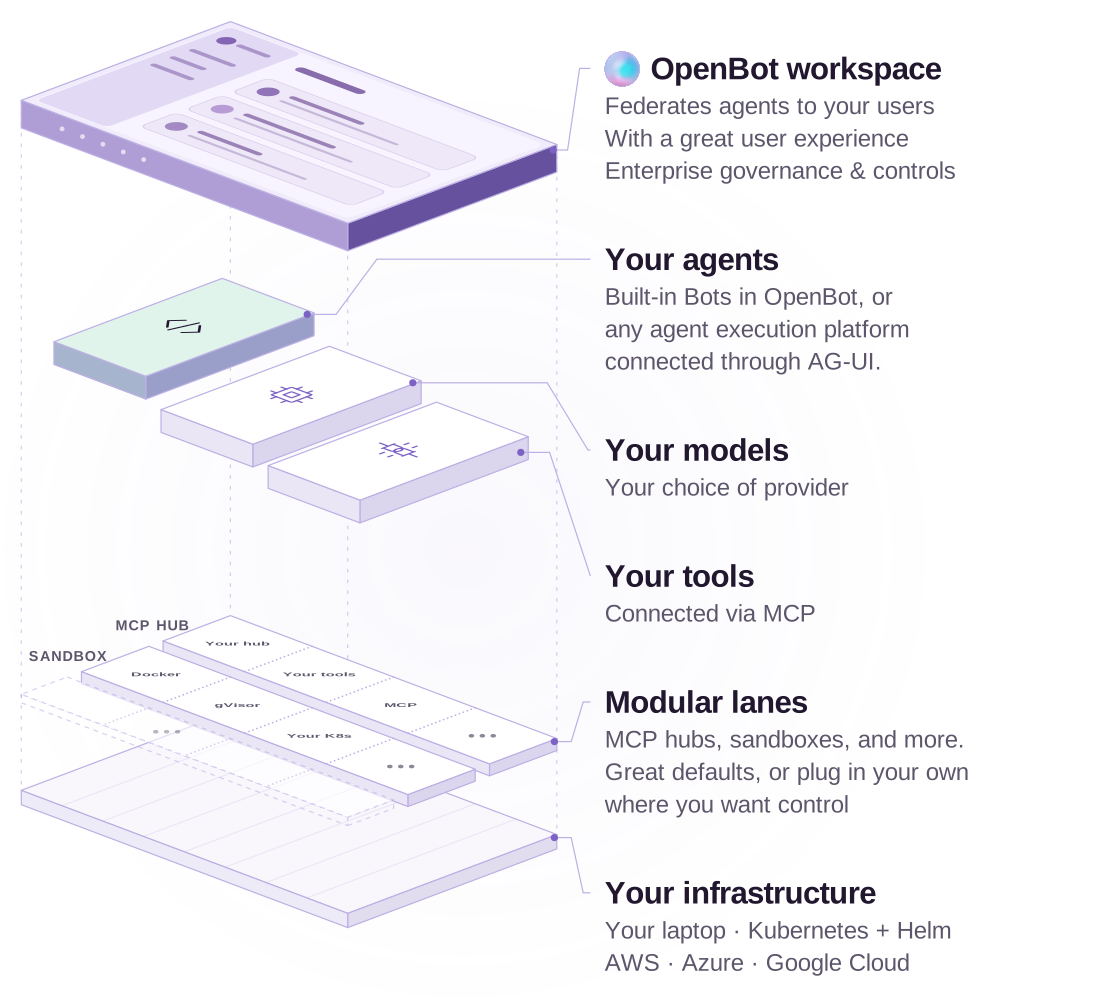
OpenBot is built on CopilotKit, which is used in production by a majority of Fortune 500 companies.
Your agent stack. AG-UI has first-class integrations across the major agent frameworks and harnesses, including Anthropic's Claude Agent SDK, Microsoft Agent Framework and Agent Harness, Google ADK, AWS Strands, Oracle Agent Spec, LangChain, Mastra, Pydantic AI, Agno, and CrewAI. Many ship first-party support; Amazon Bedrock AgentCore supports AG-UI directly.
Your execution platform. Keep your agents on Amazon Bedrock AgentCore, Claude Managed Agents, Google's Agent Platform, LangChain's Managed Deep Agents, Microsoft Foundry Agent Service, or your own infrastructure. Connect them to OpenBot through an AG-UI endpoint, using an adapter where needed. Your choice of agent platform stays independent of your workspace.
OpenBot has three parts. On your laptop, setup runs the backend and Intelligence for you. For a team, the Helm chart deploys both on Kubernetes in your own infrastructure.
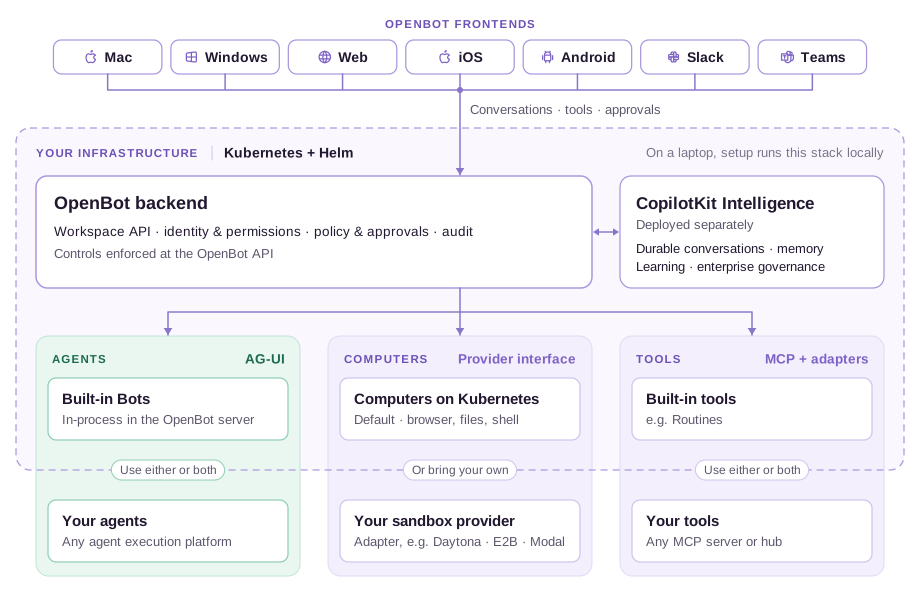
| Part | What it does | | --- | --- | | OpenBot frontends | Mac, Windows, web, iOS, Android, Slack, and Teams connect people to the same workspace. Conversations, interactive results, computer view, and approvals adapt to each surface. Choose a frontend. | | OpenBot backend | Runs the workspace API and built-in Bots, connects external agents and tools, manages Bot computers, and enforces identity, permissions, action policies, and audit. Deploys on Kubernetes with PostgreSQL and persistent storage. | | CopilotKit Intelligence | Durable conversations, memory, Automatic Learning, and enterprise governance services. Separately licensed; runs on Kubernetes alongside OpenBot. |
OpenBot enforces sign-in, tool permissions, action policies, and audit at its API, alongside Intelligence's platform services. Built-in Bots run in the OpenBot server; your own agents can run alongside OpenBot or on any agent execution platform. Both use AG-UI and can share the same workspace.
Computer execution is pluggable: use the default Kubernetes setup or connect a compatible external computer provider.
Architecture details · Services and ports · Kubernetes deployment
The OpenBot application template is open source under the MIT license. You can fork, modify, and white-label it. It uses CopilotKit Intelligence, which is separately licensed and can run entirely on your own machine or infrastructure.
| Where you run it | CopilotKit Intelligence license | | --- | --- | | Your laptop, for personal use and experimentation | Requires a free local Intelligence license. Desktop setup handles this for you. | | Kubernetes evaluation | Requires a free Intelligence trial license. Request a trial. | | Kubernetes / production | Requires a production Intelligence license beyond evaluation. OpenBot for Business includes Intelligence for use with OpenBot. Plans and pricing. |
Fully local is an option. Run OpenBot, Intelligence, and a compatible model locally. A cloud model or connected online app still sends requests to that service. Initial downloads, account sign-in, and local license renewal need internet access.
---
Deploy OpenBot and CopilotKit Intelligence together on AWS EKS, Azure AKS, Google GKE, or your own Kubernetes cluster. The chart installs Intelligence by default; no separate hosted project is required.
For a first evaluation, you need a cluster with amd64 nodes, a default StorageClass, kubectl, Helm, a trial or production license, and a model key. The commands below use an OpenAI key. For Anthropic, a model router, cluster sizing, or an existing Intelligence deployment, use the full Helm guide that comes with the chart (helm show readme on the chart below).
Setting up with an AI assistant? Give it this README and the Helm guide (helm show readme on the chart below). The guide covers cloud-specific values, storage, secrets, sign-in, networking, upgrades, and troubleshooting. Use the evaluation below only through a local port-forward; configure sign-in and TLS before sharing a deployment.
1. Create openbot-values.yaml locally. Replace the placeholders with your license and model key. Keep this file out of source control.
   config:
     singleUser: true
   postgresql:
     enabled: true
   secrets:
     licenseToken: ""
     modelApiKey: ""
2. Install the chart published with the release.
   helm install openbot https://github.com/CopilotKit/OpenBot/releases/download/v1.0.2/openbot-0.2.0.tgz \
     --namespace openbot --create-namespace \
     --values openbot-values.yaml \
     --timeout 15m
3. Open your evaluation.
   kubectl -n openbot get pods,jobs
   kubectl -n openbot port-forward svc/openbot-server 3001:3001
Open . This configuration is single-user: anyone who can reach it is an administrator. Keep the port-forward local.
The chart creates the runtime credentials, installs the databases, bootstraps Intelligence, and sets up the Learning container and scheduled jobs. Automatic Learning uses your model key too.
For a team deployment, follow the Helm guide (helm show readme on the chart) to configure authentication, TLS, your database, secrets, persistent storage, and network policies. For a single-container alternative, see Deploy it.
Use the template to customize the workspace, branding, Bots, and skills. The source setup below uses managed Intelligence by default; local Intelligence is also available.
git clone https://github.com/CopilotKit/OpenBot.git
cd OpenBot
To run the open-source template locally, you’ll need the following.
scripts/start.sh pulls at the
tag in backend-images.env: main in a checkout of main, the images built from main, and the
release's own version in a release (v1.0.3 in the v1.0.3 tag). Nothing else is built or needed
for them.
The example configuration sets OPENBOT_SINGLE_USER=true, so you can try the app as a local administrator. Configure sign-in before giving anyone else access. On a Mac, the free Developer plan also covers running Intelligence locally with Docker.
Setting up with an AI assistant? Paste prompt.txt into it first. It carries the
same steps as below plus the things that are easy to get wrong: which of the blank keys in
.env.example are actually yours to fill (the CopilotKit key and a model key), which the startscript fills for you, and what each start-up refusal means. Every claim in it is checked against
this repository.
1. Create .env:
   cp .env.example .env
   bun install
2. Connect a fresh managed Intelligence project:
   npx --yes copilotkit@latest login
   npx --yes copilotkit@latest project select
   bun scripts/setup-learning.ts
The helper provisions the selected project's runtime key, creates or reuses its
openbot Learning container, then writes both settings to .env. It preserves
custom container assignments and never replaces an existing OpenBot key; with one
set, it only creates openbot in that key's project if it is missing.
For fresh self-hosted setup, set INTELLIGENCE_API_URL to that deployment's
HTTPS API origin (or http://localhost for a local one) and run the helper
without the two npx commands. It opens an isolated Chrome or Edge window for
your usual sign-in and project choice; install either browser first. For CLI-managed
local evaluation installs, it discovers the matching dashboard with the newest installed or
cached CopilotKit CLI and uses that dashboard for login and session requests. Discovery
runs offline with Bun, without downloading the CLI or requiring npx on your PATH.
If no CLI is available, manually hosted deployments use their API origin for sign-in. Complete the local auth
approval shown in the browser when prompted. The runtime API URL stays unchanged. It writes
the API URL, the key and the container, not INTELLIGENCE_GATEWAY_WS_URL, so
set that one to the same deployment yourself. Once openbot exists, the server assigns it
as the default by itself unless Admin → Automatic Learning
has a saved setting.
Managed Intelligence needs no separate license token.
The same CopilotKit CLI sign-in provisions Composio automatically when you run
bash scripts/start.sh. If that cannot complete, OpenBot still starts, with apps
unavailable. You can run bun run setup:composio first to prepare it separately, or
later to retry; it does not need a Learning container. The helper creates or reuses one
isolated Composio project for this installation and saves its project key to .env.
Existing Composio keys and Arcade configurations are preserved. Keep the private
.env.openbot-installation-id file across restarts and interrupted setup attempts;
do not copy it into a new installation. This needs a published CopilotKit CLI with
integrations composio provision and the hosted provisioning service enabled.
See Composio setup for deployment preparation.
3. Fill the remaining required values:
OPENAI_API_KEY.env.example unless you run Intelligence yourself. The example KEY_ENCRYPTION_KEY is public and fine locally; generate your own with:
openssl rand -base64 32
4. Run:
bash scripts/start.sh
5. Open .
scripts/start.sh pulls the OpenBot images at the tag in backend-images.env, starts Docker services, applies migrations, starts the API server on port 3001 and the routine worker from the OpenBot server image, starts the app from this checkout on port 3010, and checks that the services answer their own health routes before printing next steps. It pulls on every start, so a checkout of main runs the images built from main now; offline, it uses the copies already on the machine. The server's log is docker compose logs server.
scripts/stop.sh takes the same things down, including each Bot's computer, which compose does not own; --keep-computers leaves the computers running. Nothing is deleted: the database, the Bots' files and their browser profiles are volumes.
Run the clone inside WSL 2 with Ubuntu, and run every step above from an Ubuntu terminal. Windows (WSL 2) lists what to install in Ubuntu first. Keep an Ubuntu terminal open while you use OpenBot, and open the app from your Windows browser at .
To try Intelligence on one Mac instead of the managed service, follow
Evaluate Intelligence locally. The free
Developer plan qualifies. The local license lasts 30 days and
npx copilotkit@latest local renew renews it as often as you need, while your account is in good
standing. It is a preview for macOS with Docker Desktop,
not a production installation. Run its
npx copilotkit@latest local connect from the OpenBot root, where .env is.
That command writes INTELLIGENCE_API_URL, INTELLIGENCE_GATEWAY_WS_URL and
CPK_INTELLIGENCE_API_KEY to .env. OpenBot reads those settings directly; no key
copying or renaming is needed. INTELLIGENCE_API_KEY remains supported for older
configurations. When both are set, the non-empty CLI key takes precedence so
reconnecting uses the new project's key.
To give the Bots a Learning container on that stack, see Automatic Learning.
One image carries the app, the API, the browser the Bots drive, and optionally PostgreSQL. Same
.env, no Kubernetes.
# The published image. Nothing to clone and nothing to build.
docker run -p 3001:3001 --env-file .env \
  -e EMBEDDED_POSTGRES=on -v openbot-data:/var/lib/postgresql \
  ghcr.io/copilotkit/openbot:latest
Everything is on 3001 here, the app included, rather than the 3010 the clone uses. latest is the
most recent release and a version tag such as :v1.0.1 pins one.
Leave EMBEDDED_POSTGRES off and set DATABASE_URL to point at a database you already run.
docs/deployment.md has the minimum sizes, the platform notes, and how it behaves behind more than one replica.
Pick a task you know well enough to review. For example, ask a Bot to check a hotel receipt against a travel policy in Drive. Have it show the room rate and tax separately so you can decide whether the claim meets the nightly limit. Use Teach a Bot to record the steps you want it to follow on the next claim.
/bot and ask: Open news.ycombinator.com and tell me the top story./admin/audit./admin/boundaries, add a deny rule or preset, and retry the same browser action./bots, give it a standing role, and start a channel with it.In Personal Edition, you start with one assistant on your computer. With the source template, Docker Compose starts the supporting services, PostgreSQL stores the workspace configuration, and you choose the model. OpenBot encrypts stored model credentials and keeps them out of logs.
The team template comes with two Bots. General Assistant helps with everyday work. Knowledge answers questions from the company documents you connect and cites its sources.
To add a Bot, open /bots or start from one of the YAML examples. For example, Meeting Follow-ups reads meeting notes and lists who agreed to do what. Copy its file into examples/fintech/agents/ and restart OpenBot to try it. You grant tool access separately, so you can let a Bot read a document without giving it permission to edit it.
More at open.bot.
A Bot is any endpoint speaking AG-UI, the open protocol for agent-to-user interaction, so OpenBot is not tied to a framework and neither are you. Agents built with LangGraph, Mastra, CrewAI, Pydantic AI, Google ADK or written by hand all arrive the same way, and the governance rides the protocol rather than the framework.
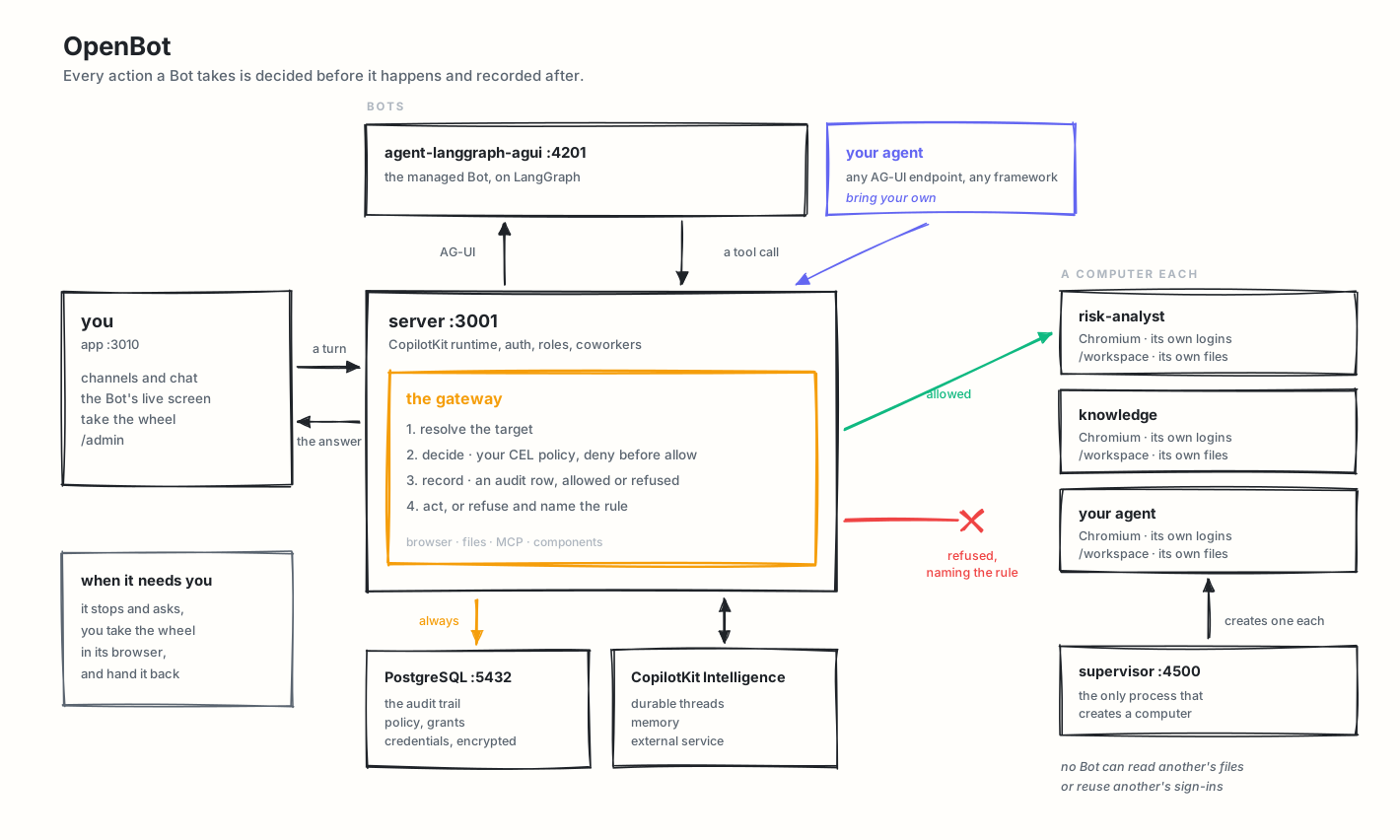
A Bot has eight things, always listed in this order: Conversations, Routines, Memory, Skills, Ap
→ →
 →
 →
 →
 →
 →
 →